
Answered
Find image Vertices
Hi Guys,
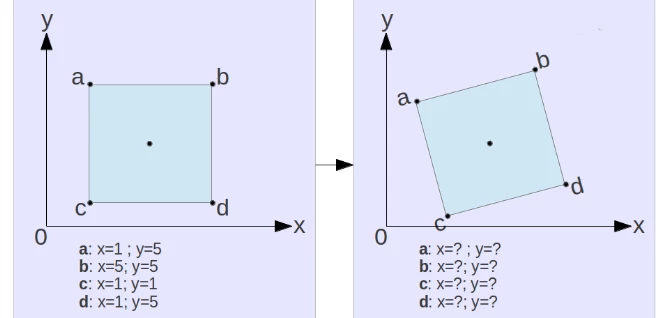
How to export image vertices data (each x=?, y=?)? Here I attached the image this explain exactly what i want.
Thanks,
Vasanth

Hi Guys,
How to export image vertices data (each x=?, y=?)? Here I attached the image this explain exactly what i want.
Thanks,
Vasanth
Thanks for your reply.
Exactly! I want photoshop scripting for generate values of path position.
Thanks
Vasanth
// 2016, use it at your own risk;
#target photoshop
if (app.documents.length > 0) {
var myDocument = app.activeDocument;
if (myDocument.pathItems.length > 0) {
var theArray = collectPathPointsInfoFromDesc (myDocument, myDocument.pathItems[myDocument.pathItems.length - 1]);
for (var m = 0; m < theArray.length; m++) {
alert (("subpathitem "+m+" has the following pathpoints\n"+theArray
}
}
};
////// collect path points coordinates //////
function collectPathPointsInfoFromDesc (myDocument, thePath) {
var originalRulerUnits = app.preferences.rulerUnits;
app.preferences.rulerUnits = Units.POINTS;
// based of functions from xbytor’s stdlib;
var ref = new ActionReference();
for (var l = 0; l < myDocument.pathItems.length; l++) {
var thisPath = myDocument.pathItems
if (thisPath == thePath && thisPath.kind == PathKind.WORKPATH) {
ref.putProperty(cTID("Path"), cTID("WrPt"));
};
if (thisPath == thePath && thisPath.kind != PathKind.WORKPATH && thisPath.kind != PathKind.VECTORMASK) {
ref.putIndex(cTID("Path"), l + 1);
};
if (thisPath == thePath && thisPath.kind == PathKind.VECTORMASK) {
var idPath = charIDToTypeID( "Path" );
var idPath = charIDToTypeID( "Path" );
var idvectorMask = stringIDToTypeID( "vectorMask" );
ref.putEnumerated( idPath, idPath, idvectorMask );
};
};
var desc = app.executeActionGet(ref);
var pname = desc.getString(cTID('PthN'));
// create new array;
var theArray = new Array;
var pathComponents = desc.getObjectValue(cTID("PthC")).getList(sTID('pathComponents'));
// for subpathitems;
for (var m = 0; m < pathComponents.count; m++) {
var listKey = pathComponents.getObjectValue(m).getList(sTID("subpathListKey"));
// for subpathitem’s count;
for (var n = 0; n < listKey.count; n++) {
theArray.push(new Array);
var points = listKey.getObjectValue(n).getList(sTID('points'));
// for subpathitem’s segment’s number of points;
for (var o = 0; o < points.count; o++) {
var anchorObj = points.getObjectValue(o).getObjectValue(sTID("anchor"));
var anchor = [anchorObj.getUnitDoubleValue(sTID('horizontal')), anchorObj.getUnitDoubleValue(sTID('vertical'))];
var thisPoint = [anchor];
theArray[theArray.length - 1].push(anchor);
};
};
};
// by xbytor, thanks to him;
function cTID (s) { return cTID || cTID = app.charIDToTypeID(s); };
function sTID (s) { return sTID || sTID = app.stringIDToTypeID(s); };
// reset;
app.preferences.rulerUnits = originalRulerUnits;
return theArray;
};
Already have an account? Login
Enter your E-mail address. We'll send you an e-mail with instructions to reset your password.
 AdChoices