
Inspiring
March 26, 2018
Question

Fixing grey hair?

  • March 26, 2018
  • 3 replies
  • 4549 views

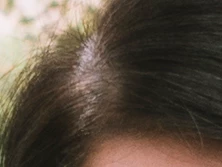
I want to cover the grey hair in the attached screen shot with darker tones from the other hair in the image. I tried sampling darker hair color and painting over the grey and lowering opacity of the layer, though that didn't look good, I also tried making a selection around the area, applying a feather and using a Curves adjustment layer, though when I drag down on different parts of the curve to darken that area it didn't look good either. What is the right way to do this?

Thanks.
    This topic has been closed for replies.

    3 replies

    Terri Stevens
    Legend
    March 26, 2018

    Another way of doing this is just to make a brush. To me this looks more like hair thinning than greying and so you won't get a good effect by changing the color as all you will do is darken the skin. .

    If you want to try this

    1) set the layers panel up like this as we need to make a hair brush

    2) With the pen tool create a simple curve to match the hair

    3) Now right click the path and select 'stroke path' You must do this on the transparent layer layer 3 here. The path will be stroked with the current brush. Here I used hard mechanical 1 pixel, which comes with Photoshop

    You should get something like below after turning off visibility on the hair layer..

    4) Make a selection around the hair follicle-this is important and define a brush

    5) Name the brush

    Incidentally it doesn't matter that the brush is pixelated as like with all brushes it is resizable. You can if you wish set 'brush settings', but I have avoided that here not to be over complicated.

    Now you can start to recreate the missing hair. You need to experiment to get the correct brush size and you also need to sample the local hair color so you get variation. In addition the direction of the brush has to be adjusted to fit the direction of the hair. Now just make single clicks to build up the hair

    you can see below how to change the angle of the brush

    There are other things you can do like lower the opacity of the hair replacement and you can use a hue/saturation layer to change the saturation and color. It will of course work best on a higher quality image than the one you supplied but I hope this helps

    Before

    After

    c.pfaffenbichler
    Community Expert
    Community Expert
    March 26, 2018
    To me this looks more like hair thinning than greying

    One could even suspect this is simply the scalp shimmering through at the parting, which I think is fairly common.

    Trevor.Dennis
    Community Expert
    Community Expert
    March 26, 2018

    You've not given us much to work with, but another approach would be to copy the hair each side of the parting, and Free Transform it to fill the gap.  Set the blend mode to Darken to get a better effect (Only the overlapping dark hairs will show.)

    \

    c.pfaffenbichler
    Community Expert
    Community Expert
    March 26, 2018

    I would consider painting it in on a separate Layer with a desaturated, High Pass-filtered copy of the image set to Linear Light clipping masked to it.