Exit
  • Global community
    • Language:
      • Deutsch
      • English
      • Español
      • Français
      • Português
  • 日本語コミュニティ
  • 한국 커뮤니티
1

Font sizes changed when opening file on new computer

Community Beginner ,
Feb 13, 2018 Feb 13, 2018

I received a new Macbook Pro at work to replace a Dell running Windows 8. When I opened my photoshop file on the new machine the files seemed the exact same until I went to change the text. All the fonts are a smaller point size even though they look the same as before. In all cases the font has gotten smaller, but not by the same proportion. For example, text that was originally 16pt is now 7.98pt and text that was 24pt is now 13.44pt. Does anyone have any suggestions on how to get the font sizes back to their original size?

1.7K
Translate
Report
Community guidelines
Be kind and respectful, give credit to the original source of content, and search for duplicates before posting. Learn more
community guidelines

correct answers 1 Correct answer

Community Expert , Feb 14, 2018 Feb 14, 2018

This is just a guess, but with a new MBP I suspect that the display is going to have a much higher resolution, and I wonder if Photoshop senses that and adjusts in Preferences > Units & Rulers?
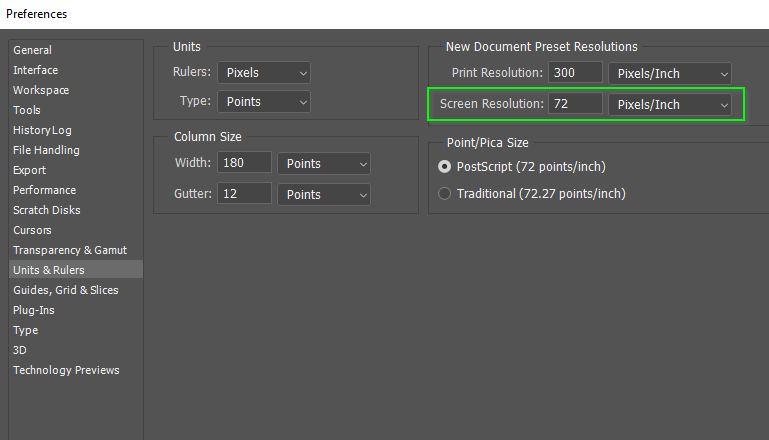
Also think about UI scaling, and what rulers are set to.  The latter for instance, can effect the way Actions work.

Do you still have the old computer to compare those settings?

Translate
Adobe
Adobe Employee ,
Feb 13, 2018 Feb 13, 2018

Hi Courtneyk,

Could you please let us know, are those fonts are still the exact same or have they changed?
Also, is it happening with all the PSD files or one specific file?

Regards,

Sahil

Translate
Report
Community guidelines
Be kind and respectful, give credit to the original source of content, and search for duplicates before posting. Learn more
community guidelines
Community Beginner ,
Feb 14, 2018 Feb 14, 2018

Hi Sahil,

The fonts are still the same. The issue is happening with every PSD files but the size is changing consistently across the files. For example, font that was 24pt in different files is all becoming 13.44pt.

Translate
Report
Community guidelines
Be kind and respectful, give credit to the original source of content, and search for duplicates before posting. Learn more
community guidelines
Adobe Employee ,
Feb 14, 2018 Feb 14, 2018

Could you please try creating a file on the new computer, then add some text and specify the size of the text, then save it as a .PSD and close Photoshop, then open that .PSD file again and see if the issue re-appears.

Translate
Report
Community guidelines
Be kind and respectful, give credit to the original source of content, and search for duplicates before posting. Learn more
community guidelines
Community Expert ,
Feb 14, 2018 Feb 14, 2018

This is just a guess, but with a new MBP I suspect that the display is going to have a much higher resolution, and I wonder if Photoshop senses that and adjusts in Preferences > Units & Rulers?

Also think about UI scaling, and what rulers are set to.  The latter for instance, can effect the way Actions work.

Do you still have the old computer to compare those settings?

Translate
Report
Community guidelines
Be kind and respectful, give credit to the original source of content, and search for duplicates before posting. Learn more
community guidelines
Community Beginner ,
Feb 15, 2018 Feb 15, 2018

Trevor.Dennis​'s response was able to lead me to the solution. These are the settings on the Units & Rulers page from my old computer

And this is the new:

Screen Shot 2018-02-15 at 8.22.35 AM.png

The resolution was the same but I noticed the units were different. When I changed the units to match the old settings the problem was resolved. Thank you both for your help!

Translate
Report
Community guidelines
Be kind and respectful, give credit to the original source of content, and search for duplicates before posting. Learn more
community guidelines
Community Expert ,
Feb 15, 2018 Feb 15, 2018
LATEST

Thanks for the feedback.  That is going to help other people going forward. 

Translate
Report
Community guidelines
Be kind and respectful, give credit to the original source of content, and search for duplicates before posting. Learn more
community guidelines


