
Participant
April 25, 2019
Answered

GIF opens in web browser & cannot be uploaded to Facebook

  • April 25, 2019
  • 2 replies
  • 1506 views

Hi, Apologies if this is a really dumb question...

I’ve created a gif in photoshop by following Adobe’s steps, it’s very easy & I can preview my gif in my web browser.

My question is: when I Export for web & click save, it saves an html file which I’m struggling to use. It opens in my web browser but I can’t email it, attach it to a Facebook post etc.

What am I doing wrong? It’s so frustrating... can any of you guys help? I’m sure it’s something very simple.

Thanks, Mel

{Thread renamed by Moderator}
    This topic has been closed for replies.
    Correct answer Nancy OShea
    it saves an html file...

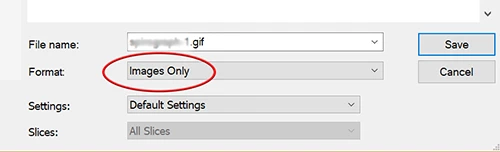
    In your Save settings under Format, select Images Only.  See screenshot.

    2 replies

    Nancy OShea
    Community Expert
    Nancy OSheaCommunity ExpertCorrect answer
    Community Expert
    April 25, 2019
    it saves an html file...

    In your Save settings under Format, select Images Only.  See screenshot.

    Nancy O'Shea— Product User & Community Expert
    Participant
    April 26, 2019

    DOH!

    Thanks Nancy! Just one more question, saving "Images Only" allows me to upload to Facebook but if I embed the gif in an email it doesn't animate, any idea why?

    Cheerio

    Nancy OShea
    Community Expert
    Community Expert
    April 26, 2019

    Most e-mail clients like Outlook don't support embedded animation.  You could try sending it as an attached file.  Or as Sahil suggested, upload your GIF to a public facing web server or file sharing service.

    Nancy O'Shea— Product User & Community Expert
    Sahil.Chawla
    Adobe Employee
    Adobe Employee
    April 25, 2019

    Hi Mel,

    As you've already created a gif, it can be shared on Facebook, however, you have to upload it on a website which will then create a unique url for the gif. That url can be shared on Facebook because the gif format is not supported by Facebook. You can use a website like this https://giphy.com/  to upload the gif.

    Please check this article to know more: https://socialmediaexplorer.com/content-sections/tools-and-tips/how-upload-gifs-facebook/


    The gif is opening in a web browser because it is set as a default application to open gifs on your operating system. However, you can always change the file association. Please check the links below to know how:

    Please let us know if it helps.
    Regards,
    Sahil

    Participant
    April 26, 2019

    Thanks Sahil,

    I think that's over-complicating things a little, see Nancy's answer below yours.

    That worked but the gif won't animate in an email, any idea why?

    Have a good day