bobelmore
Inspiring
May 15, 2017
Answered

Glow and Blur in Photoshop

  • May 15, 2017
  • 2 replies
  • 1067 views

I know this is probably very simple, but I want to add some glow and blur to use as a highlight for screen shots.

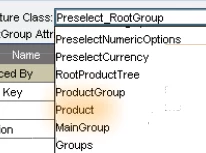
I do this in Adobe Captivate using glow and blur effects (see below), and I know there similar options (and more) in Photoshop.
Thanks.
    This topic has been closed for replies.
    Correct answer davescm

    Hi

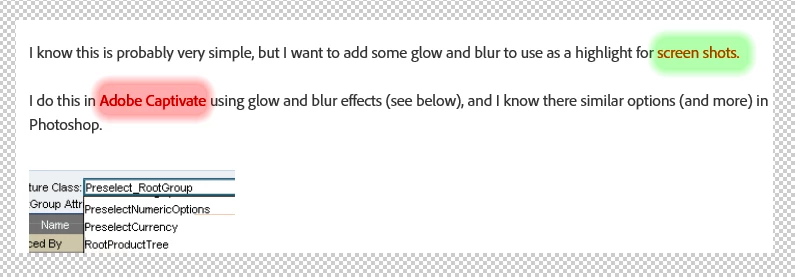
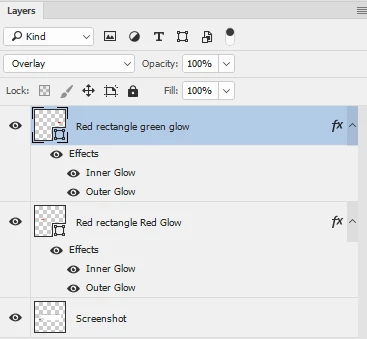
    Taking a screenshot of your post I added a couple of red rectangle shapes set to overlay (which turned the text red the same as the shape). Then I added, with layer styles, a green and red inner and outer glow which gave the blur.

    You can play around with the layer styles to get the effect you want and go for gradients rather than plain colours etc

    Dave

    2 replies

    bobelmore
    bobelmoreAuthor
    Inspiring
    May 16, 2017

    Thanks Dave.  I am still a little confused but getting the hang of it.  I didn't realize everything could be done within the layers area.

    Far more sophisticated than what Captivate offers.

    davescm
    Community Expert
    Community Expert
    May 16, 2017

    Yes layer styles and blending modes are powerful tools. The links below may help.

    Layer effects and styles in Adobe Photoshop

    Blending modes in Adobe Photoshop

    Dave

    davescm
    Community Expert
    davescmCommunity ExpertCorrect answer
    Community Expert
    May 15, 2017

    Hi

    Taking a screenshot of your post I added a couple of red rectangle shapes set to overlay (which turned the text red the same as the shape). Then I added, with layer styles, a green and red inner and outer glow which gave the blur.

    You can play around with the layer styles to get the effect you want and go for gradients rather than plain colours etc

    Dave