Exit
  • Global community
    • Language:
      • Deutsch
      • English
      • Español
      • Français
      • Português
  • 日本語コミュニティ
  • 한국 커뮤니티
0

Gradient Editor

New Here ,
Nov 04, 2012 Nov 04, 2012

The Gradient Editor is missing the the lower portion of the window.  No color stops for creating your own gradient colors or number of colors you want in your gradient.  The upper portion of window is their with the preinstalled gradient options.  Photoshop CS6.  I have searched high and low for a solution and reset the the tool and preferences.  No luck.  Please advise.

23.4K
Translate
Report
Community guidelines
Be kind and respectful, give credit to the original source of content, and search for duplicates before posting. Learn more
community guidelines

correct answers 1 Correct answer

Community Expert , Nov 04, 2012 Nov 04, 2012

Hi NewLife_777,

What operating system are you using?

From where in photoshop cs6 are you looking for the Gradient Editor?

You might post a screenshot of what your seeing.

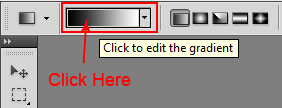
If for example, it's the gradient tool, did you click on the Preview of the gradient?

Untitled-1.png

Translate
Adobe
Community Expert ,
Nov 04, 2012 Nov 04, 2012

Hi NewLife_777,

What operating system are you using?

From where in photoshop cs6 are you looking for the Gradient Editor?

You might post a screenshot of what your seeing.

If for example, it's the gradient tool, did you click on the Preview of the gradient?

Untitled-1.png

Translate
Report
Community guidelines
Be kind and respectful, give credit to the original source of content, and search for duplicates before posting. Learn more
community guidelines
New Here ,
Nov 04, 2012 Nov 04, 2012

Well duh... I can't believe I did that. Overthinking...I think.  You have resolved it.  I was clicking on the drop down arrow immediately to the right of the red arrow you placed.  That was opening a pop out window with all the preset gradient options but without the color stop options etc...  Clicking right where you state to click provides the full gradient editor window of have been struggling to find for over an hour.  Thank you so much...

Translate
Report
Community guidelines
Be kind and respectful, give credit to the original source of content, and search for duplicates before posting. Learn more
community guidelines
New Here ,
Jan 20, 2018 Jan 20, 2018

WOW....me too Thanks!!!

Translate
Report
Community guidelines
Be kind and respectful, give credit to the original source of content, and search for duplicates before posting. Learn more
community guidelines
New Here ,
Feb 03, 2021 Feb 03, 2021
LATEST

Same here... OMG hehhe


Translate
Report
Community guidelines
Be kind and respectful, give credit to the original source of content, and search for duplicates before posting. Learn more
community guidelines
Guest
Oct 15, 2013 Oct 15, 2013

I have a problem with this because when I click on that no window comes up or anything? And then after that when I try to click on things nothing happens and windows makes that noise when you're trying to click off of an open window and it won't let you? Any suggestions?

Translate
Report
Community guidelines
Be kind and respectful, give credit to the original source of content, and search for duplicates before posting. Learn more
community guidelines
Community Expert ,
Oct 15, 2013 Oct 15, 2013

Hi,

What version of windows and photoshop are you using?

Translate
Report
Community guidelines
Be kind and respectful, give credit to the original source of content, and search for duplicates before posting. Learn more
community guidelines
Guest
Oct 15, 2013 Oct 15, 2013

CS5, new ones too much to get used to.

Translate
Report
Community guidelines
Be kind and respectful, give credit to the original source of content, and search for duplicates before posting. Learn more
community guidelines