
Known Participant
January 27, 2017
Question

Gradient Overlay in Layer Style Not Showing Radial Gradient

  • January 27, 2017
  • 7 replies
  • 4932 views

Hello and thank you for your help and time.

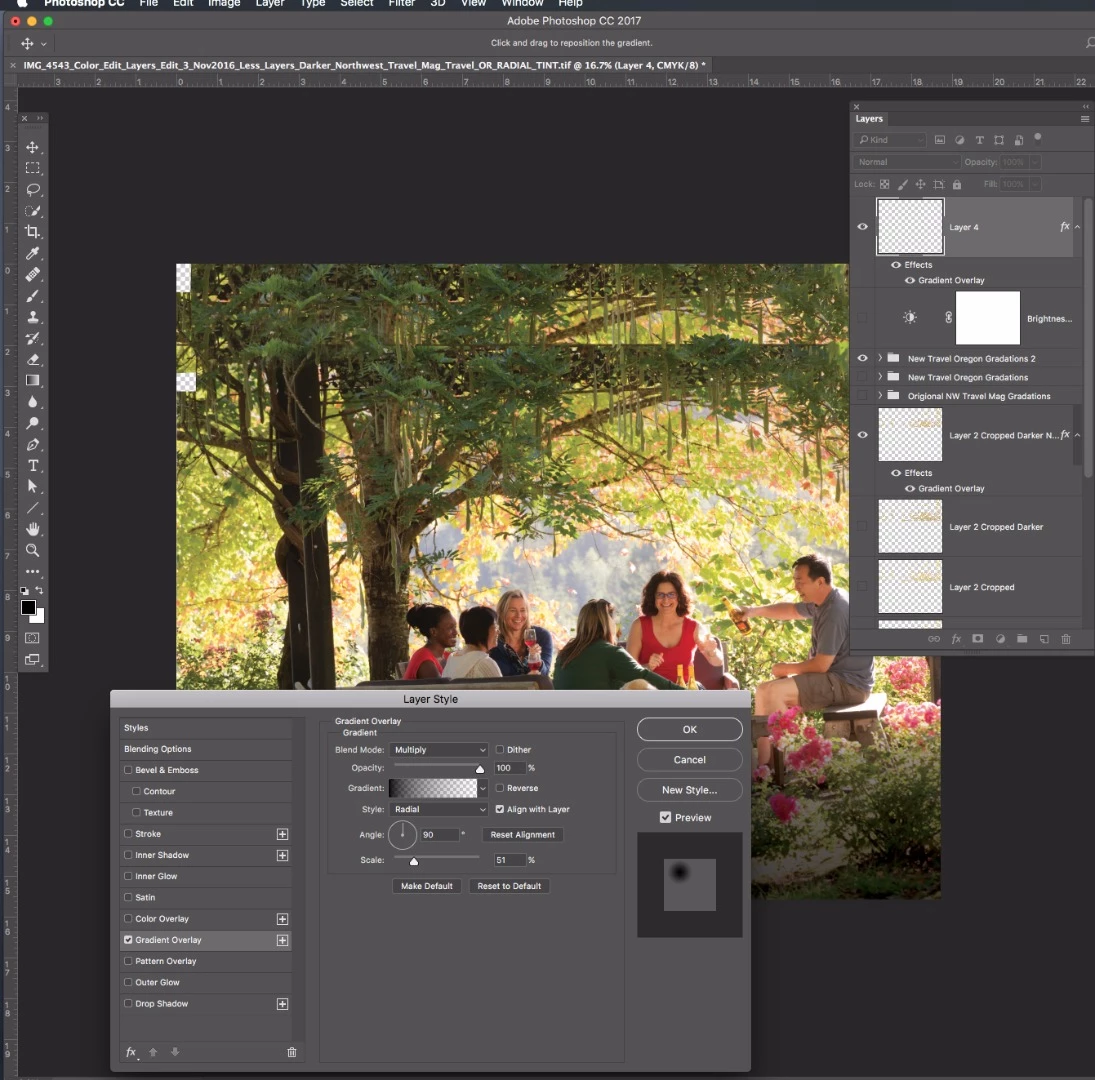
I'm trying to create a radial gradient in my layer style. In the Layer style / Gradient Overlay it shows a picture of the radial gradient in the box on the right hand side. But, it doesn't show or create the radial gradient when I click OK. How can I create a radial gradient in Photoshop CC that I can move and edit.

Thanks
This topic has been closed for replies.

7 replies

New Participant
February 20, 2020

I'm having the exact same issue.  The Radial gradient isn't working for me either.  I though I was just crazy.

KAAinPA
New Participant
August 18, 2021

Hi! I too was having this problem. I just figured out that my "mode" was set to "screen". Once I changed it to normal then it worked. 


Hope this helps someone!


ChrisG66Author
Known Participant
January 27, 2017

Thank you all. I greatly appreciate the suggestions. I found out when I create a gradient adjustment layer I can move the radial gradation when the Gradient Fill menu is showing. I can also change the size and adjust my gradation level. Kind of tricky, but I figured it out. Thanks again for your help and time with this.

Semaphoric
Community Expert
January 27, 2017

Try this: Make a circular Shape with the Ellipse tool, fill black with no stroke. Set the Fill to zero%:

Now add the Gradient overlay, and you can move and resize it using the Move tool.

Mohammad.Harb
Community Expert
January 27, 2017

The layer  you are trying to add gradient overlay on is empty   ( Layer 4 is Transparent )

ChrisG66Author
Known Participant
January 27, 2017

That is correct. The layer is empty because when I click OK in the layer style menu, it doesn't create the gradation. So strange.

Semaphoric
Community Expert
January 27, 2017

Layer Styles are only applied to the non-transparent portions of a layer.

ChrisG66Author
Known Participant
January 27, 2017

Hello Adobe,

Why is my posted content rejected?

ChrisG66Author
Known Participant
January 27, 2017

I'm not sure what the other blending mode is?

postrophe
Inspiring
January 27, 2017

Hi

Have you tried other "blending mode" ?

Pierre