
Participating Frequently
July 28, 2020
Question

Gradient tool is broken

  • July 28, 2020
  • 3 replies
  • 488 views

Okay, this is annoying me to high heaven

I want a foreground to transparent grad, and I'm using the grad tool.
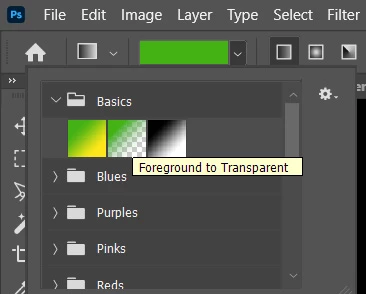
 

now before you didn't have these folders (an extra annoying step in the work flow tbh) but when I click the F>T option ... its a solid colour fill. when I click the bar to change it shows this.
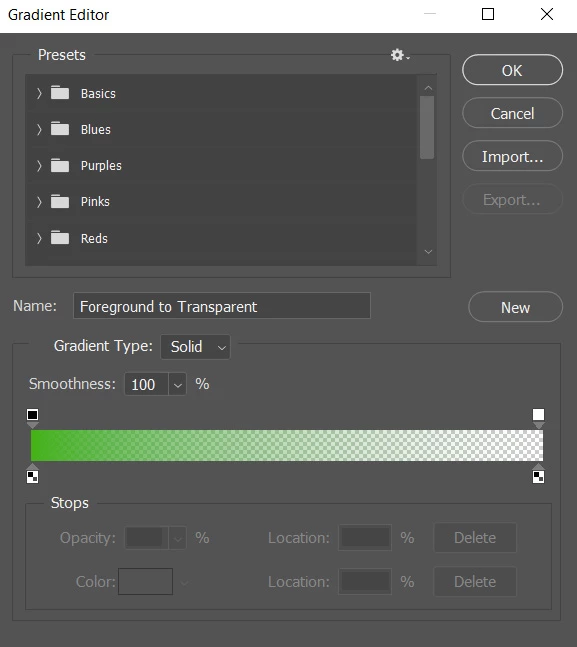
 

whats going on here? Im I broken of the tool? What changed? (I have a deadline btw and this is ballsing me up!)


This topic has been closed for replies.

3 replies

JJMack
Community Expert
Community Expert
July 28, 2020

If you do not like that you can use the gradient Palette delete all the groups. Load the old legacy group and move all the gradient out of the folders an delete the empty folder own your gradient palette

.

JJMack
JohanElzenga
Community Expert
Community Expert
July 28, 2020

Do you mean the word 'Solid' for Gradient Type? Click on it and you'll understand what that means. It does not mean that you'll apply a solid color, but that the color of the gradient is smooth. The alternative is to add a bit of noise, to avoid banding.

-- Johan W. Elzenga
c.pfaffenbichler
Community Expert
Community Expert
July 28, 2020

Either I can’t follow your desription (please post more meaningful screenshots and don’t clip them) or I just can’t reproduce the issue. 


What have you done for trouble-shooting so far? 

Restoring Preferences after making sure all customized presets like Actions, Patterns, Brushes etc. have been saved might be a good starting point:

https://helpx.adobe.com/photoshop/kb/basic-trouble-shooting-steps.html


If you dislike the Groups you can move the relevant Gradients out and remove them.