

Histogram problems in 19.1.0
I am experiencing problems with the histogram in 19.1.0. I am a mid-career fine art photographer by profession, and have been a PS user since Version 2. I am also a member of the Authors Guild, and write on photography for various publications.
I have been purposely hanging back at PS 2015.5.1, as it has served me well. Yesterday, I decided enough, is enough, and installed 19.1.0.
This first histogram is at Cache Level 1 for the file values of a 36Kx24K pixel 16-bit grayscale file.
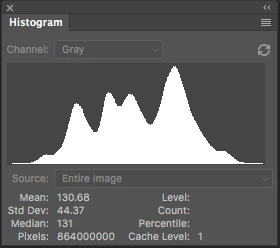
Please notice how there are "tails" (lines) out each side of the main body of data, indicating that there are small levels of data almost to the limits of range. For me, it is important to know about these tails exist so that I do not end up creating a clipped condition when applying a curve function.
Here is the exact same file at Cache Level 1 for the same 36Kx24K pixel 16-bit grayscale file, but this time in 19.1.0.
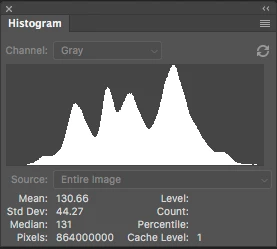
Please notice how there is no tail indicating data extending to the left, and rather a botched one going to the right. This is not helpful! Has any one found a workaround or is this a "new feature" of histogram displays? You will also notice that the Mean and Standard Deviation values differ.
Further, it use to be nice to be able to take the cursor and scan across the histogram with a display of level and count showing up for whatever was under he cursor. This seems to have gone away in 2015.5, and is even worse in 19.1.0. Again, am I missing something on setup options or is Adobe really going off their nut?
Thanks for your help. Before I make a formal complaint about the issues, I could use the community's help in double checking that I did not screw up the setup. I cannot find any histogram preferences setup, but perhaps I am missing something.
Pete
 AdChoices