Ken Nielsen
Legend
September 30, 2018
Answered

How can I get spacebar and command make hand tool and magnify again? [2018]

  • September 30, 2018
  • 4 replies
  • 7222 views

For decades, the space bar and in combination with the command tool (when using the arrow cursor) make the hand tool and then, together, make the magnify tool respectively...


For some reason now, and I have been in preferences over the past week changing everything I can imagine and still no standard behavior. I have several other issues with slices areas showing and windows 'hiding' and having to be brought back by going into menus... Overall, the working performance of Photoshop with the latest CC 2018 version has gone downhill and my work has been overtaken with simply trying to restore Photoshop to a normal behavior. Could it be this latest release?


I've never needed to go backward and re-install older versions of Photoshop before, but now, I am considering, simply because I need to get back to work.


I've RESTORED Photoshop at startup, trashing all of my prefernences, I've been through all of the preference settings and changed every conceivable thing to no avail... the spacebar and command key no longer bring up the hand tool and magnify icons... I need to go to the 'H' keyboard shortcut and select 'Hand' tool before the spacebar and command key then work in the expected way... not an acceptable workaround...


Photoshop is throwing my business for a loop and I don't know how to recover now except to go back to my version 6 which is on CD in storage... I don't want to do that because before the last update, everything was working fine...


Any Ideas?


TIA,


Ken
This topic has been closed for replies.
Correct answer gener7

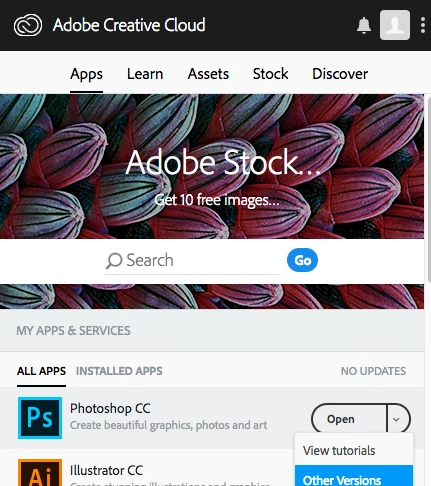
Then know you can "rollback" to earlier updates. You will have the option to keep your settings.

So uninstall 19.1.6, then from the the CC desktop app, go to  the Apps tab and click on the down pointing arrow:


Also, while this pertains to MacOS 10.14, see  if this helps:

4 replies

Participant
September 16, 2020

This solved the issue for me but when I restarted, the issue came back. It's really weird. Not sure what to do. Any advice would be appreciated.

jane-e
Community Expert
Community Expert
September 16, 2020

Hi

Since the Spacebar and Spacebar+Command shortcuts stop working when you reboot your Mac, the most likely cause is that the shortcuts are being taken over by another application. What is in your Login items in System Prefs?


Also, Cmd+Spacebar is assigned to Spotlight. I find that while it comes up immediately, as soon as I start to drag Spotlight goes away and I can zoom. Some folks change that shortcut.


~ Jane


Ken Nielsen
Legend
October 1, 2018

How on earth did you know this gener7?

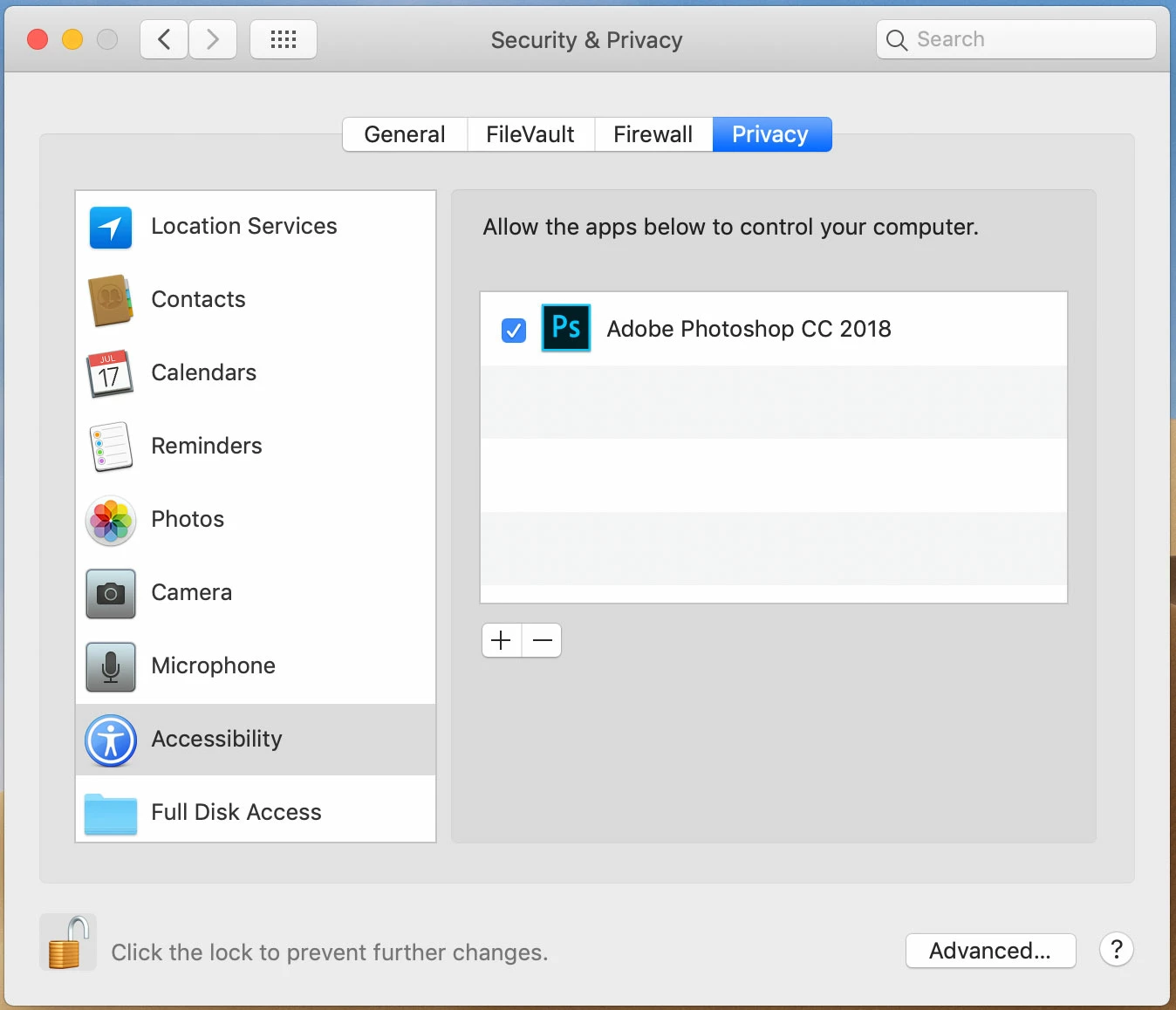
I'm going to work tomorrow, Monday morning, with a restored Photoshop and I didn't have to do any more than come here and get the right answer. I don't know why this works, letting Photoshop control my computer? - Whatever, it works.

Can you give me a brief explanation of what this does?

Thank You With My Greatest Thanks and Appreciation!

Ken

gener7
Community Expert
Community Expert
October 1, 2018

https://forums.adobe.com/people/Ken+Nielsen  wrote

How on earth did you know this gener7?

I'm going to work tomorrow, Monday morning, with a restored Photoshop and I didn't have to do any more than come here and get the right answer. I don't know why this works, letting Photoshop control my computer? - Whatever, it works.

Can you give me a brief explanation of what this does?

Thank You With My Greatest Thanks and Appreciation!

Ken

Ken,

I forgot to ask you what version of MacOS you are running. Looking in your posting history, it was Mojave, released last week.

Adobe has documented Photoshop bugs with Mojave here:

Known issues - Running Photoshop CC on macOS 10.14 Mojave  That's where I got it.

Apple has tightened  down on what apps can do on their system and that is why you specifically have to give Photoshop permission via Accessibility. I don't know the fine points, I should leave that to Apple Support's forums. I don't think CC 2018 is "Mojave ready".  CC 2019, to be released soon is.

Installing an new OS on a "mission critical" Mac, one on which you have to get work done is a hazardous move. That's why I'm running 10.13.6 on my primary machine and 10.14 on my spare.

Noel Carboni (longtime forum member and Windows beta tester) left us this advice:

Conscientious folks who need critical things to keep working don't just change out a working OS and complain to application makers that their having done so breaks their applications.  They test, they research.  THEN they migrate when it's safe to do so.

To be fair you thought it was the Adobe upgrade and not  the MacOS upgrade that broke things, and for a while so did I.

Gene

Ken Nielsen
Legend
October 1, 2018

The behavior was going on before I switched to Mojave, which, by the way, has been working like a dream. No issues with that (yet) - but good advice from knowledgeable people who we have got to respect, is the foundation of these forums. I’m still amazed at you coming up with the ‘way out there there’ solution.

Thanks Again and have a good week ahead,

Ken

Muqqarib Hassan
Inspiring
September 30, 2018

Hi, Or Check the keyboard shortcuts in photoshop. May be  spacebar hand tool shortcuts changed there.

You can view, edit, and summarize keyboard shortcuts in the Keyboard Shortcuts dialog box. To view this in Photoshop, select Edit > Keyboard Shortcuts or use the following keyboard shortcuts:

  • Alt + Shift + Control + K (Windows)
  • Alt + Shift + Command + K (macOS)
Ken Nielsen
Legend
September 30, 2018

Yes, I already, as mentioned above, have done the reset and nothing changed except some of my modifications are now gone.

I looked in Keyboard Shortcuts and there is nothing for the behavior of calling up the hand or zoom tool while the move tool is selected, I've always been able to press spacebar to get the hand or spacebar and command to get the zoom icon... none of that works now...

All the Keyboard Shortcuts menu shows now is that I can get the zoom tool by pressing the 'Z' key or the hand tool by pressing the 'H' key... does this mean that the old standard shortcut over the past 30 years has been eliminated?

I don't see why this would be done... but apparently there is no way to return to the old shortcut...

Very Puzzling...

gener7
Community Expert
Community Expert
September 30, 2018

Would you happen to have anything on your PC that would trap these keys? Webroot's Secure Keyboard Entry is one.

Muqqarib Hassan
Inspiring
September 30, 2018

Hi,

To reset Adobe Photoshop back to the default settings:

  1. Make sure Photoshop is closed.
  2. PC users: Hold down the Ctrl + Alt + Shift keys.
    Mac users: Hold down the Cmd + Alt + Shift keys.
  3. Open Photoshop whilst the keys are still held down.
  4. A message will appear asking if you want to delete the settings file. Click Yes.

And Check this Video How its work.

Tricks of the Hand Tool - Photoshop CC - YouTube