Participant
June 7, 2019
해결됨

How do I edit text in photoshop cc after saving the file?

  • June 7, 2019
  • 4 답변들
  • 7957 조회

I need help figuring out how to edit text in photoshop after saving it as a psd. It's my resume and I need to add new information to it.

이 주제는 답변이 닫혔습니다.
최고의 답변: davescm

Hi

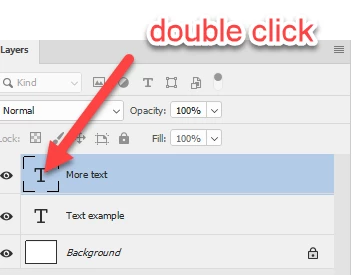
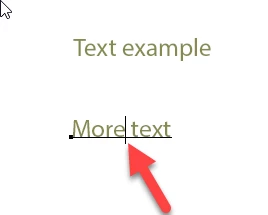
As long as you did not flatten the file before saving, then just double click on the text icon in the layers panel then edit the text
then edit
Dave

4 답변

Participant
May 8, 2020

Hello

how do I change text after saving an image 

it may have already been flattened because I cannot edit it, I need to add 2 missing workd

Participant
May 8, 2020

Words

pixxxelschubser
Community Expert
Community Expert
June 7, 2019

Assumed your text is still text after saving (and not shapes or pixel or you does have flattened your image before saving).

Choose the text tool and click in your document between the letters.

If that does not work for you - show us a screenshot please with text tool active and the image and the layers panel with your text layer.

Bojan Živković11378569
Community Expert
Community Expert
June 7, 2019

The very first question is do you have text on Type layer? Type layer thumbnail is marked in the Layers panel with letter T as on screenshot below.

If you have type layer then activate Horizontal Type Tool (my guess you have horizontal oriented text), navigate muse over text and click once, that will activate text so you can edit it. After editing text confirm using checkmark in the options bar or shortcut Ctrl + Enter. Another way is to select all text by double clicking on type layer thumbnail then retype text or click anywhere inside text then start typing or select only certain part of text to retype it/delete it.

davescm
Community Expert
davescmCommunity Expert답변
Community Expert
June 7, 2019

Hi

As long as you did not flatten the file before saving, then just double click on the text icon in the layers panel then edit the text

then edit

Dave