Participant
February 23, 2018
解決済み

How do I make a dual-color line?

  • February 23, 2018
  • 返信数 4.
  • 4687 ビュー

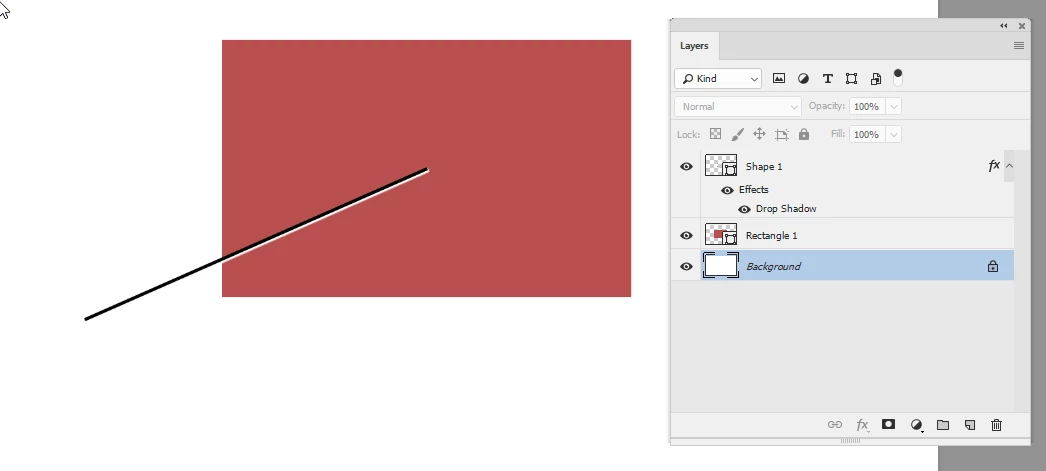
I'd like to create dual-color lines in Photoshop CS6. Specifically, black and white lines as shown in this graphic. As you can probably surmise from the graphic, the purpose of the black and white line is to allow the use of an "indicator line" (for want of a better term!) on any varying background without the line getting "lost" in the background at any point along its length: the line looks black on a white background, and it looks white on a dark background.

このトピックへの返信は締め切られました。
解決に役立った回答 davescm

Hi

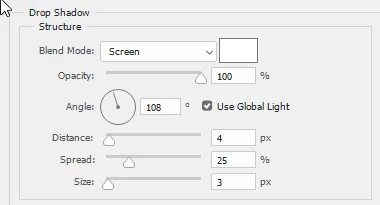
You could make a line with a black stroke and then add a layer style set to drop shadow - but set the shadow to white and blending mode screen.

Dave

返信数 4

JJMack
Community Expert
Community Expert
February 24, 2018

Tried to use Photoshop deco script but could not come up with a pattern to draw a smooth black and white curved line.

JJMack
JJMack
Community Expert
Community Expert
February 23, 2018

Vertical and horizontal lines can be made with the line tool with a pattern fill  made for the lines weight

with pattern fills you can create some crazy lines

You may be able to do something like that a deco scripted patterns Adobe Research » Deco Scripted Patterns in Photoshop

It also easy to draw straight line with a paint brush using a method where you click on end of the line move to the other and shift click.

you can stroke curved path so they can be made with two strokes.

JJMack
Norman Sanders
Legend
February 23, 2018

New Layer

Line tool, either Pixel or Shape

Layer Style > Drop Shadow. Color: White. Opacity. 100%; Distance 2 or more pixels

davescm
Community Expert
davescmCommunity Expert解決!
Community Expert
February 23, 2018

Hi

You could make a line with a black stroke and then add a layer style set to drop shadow - but set the shadow to white and blending mode screen.

Dave

chris_in_ct作成者
Participant
February 23, 2018

There it is!

Many thanks, Dave. There's no way I would have stumbled on that solution!

-Chris

davescm
Community Expert
Community Expert
February 23, 2018

You're welcome

Dave