Participant
May 1, 2013
Answered

How do I print a very large photo across multiple 8 x 10 pages?

  • May 1, 2013
  • 14 replies
  • 511046 views

I am trying to use Photoshop to create a glass pattern that is larger than letter size paper.  Is there a way to print a single photo split across multiple pages?

Correct answer Conrad_C

Although that works, it’s a lot more work than the other suggestions. Using the automatic tiling in Acrobat or InDesign means you just set it up, click Print, and it works.


The Slice tool method also has several problems:

  • The Slice tool cannot create overlaps like real print tiling features do. Auto-tiling can automatically create overlaps between tiles to cover up any gaps between printed tiles when they are mounted together later. 
  • Because each slice gets exported as a separate file, you have to print them individually. 20 tiles means you do 20 print jobs. With automatic tiling, you print once and you are done. 
  • Because Save for Web is not designed for printing, the image resolution metadata (and therefore the print dimensions) may be lost unless it is exported with All Metadata selected. 
  • If print color quality is important, attention must be paid to the document color profile vs what Save for Web is set to export. 


Overall, it is much easier, faster, and more reliable to use automatic tiling.


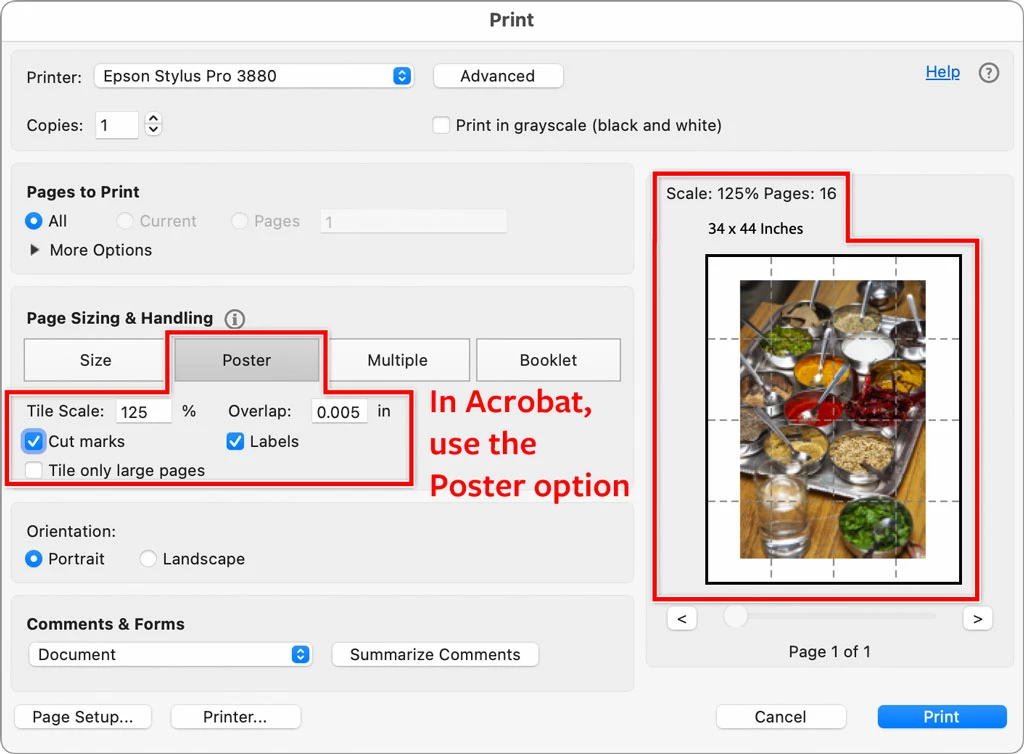
Using Acrobat is easy because the Reader is free, and can open Photoshop files, so you can be ready to print in less than a minute. Just open the Photoshop file in Acrobat, choose Print, set up tiling, and you are done. 


I agree this feature should be in Photoshop. But until then, tiling in Acrobat or InDesign is the simplest, fastest way. In the picture below, a Photoshop file is shown ready to tile in the Print dialog box in Acrobat.
 

14 replies

PhotoRoy1
Known Participant
May 1, 2013

Epson printers usually have a tiling function. You can take a file and print it in up to 16 sheets.

Participant
May 1, 2013

Photoshop doesn't have a tiling feature as far as I know and I looked. Place the file into an Illustrator document. Illustrator has a tiling feature in the print options that make it very easy.

InnQuDotCom
Participant
May 1, 2013

Create a new document at the size you need it, then make guides to divide up the canvas into 8.5in x 11in sections. Add your graphics and when you're ready to print select one of the sections and crop the image then print it, then undo it and crop the next section and print it and so on. I'd flatten the artwork before each crop.

Silkrooster
Legend
May 1, 2013

It's called tiling. Create the doument at a size larger than the printer can handle, then you should see an option in the printers panel or in the printers preferences for tiling. If you have acrobat pro, that has a tiling feature as well.