
robertakayne
Participating Frequently
April 29, 2018
Answered

How do I remove a filter from drop down menu?

  • April 29, 2018
  • 1 reply
  • 9110 views

I installed Skylum Luminar (Macphun) and didnt like it, so I uninstalled it, but now I cant remove it from the filter menu in Photoshop. I am using Windows 10, Adobe Photoshop CC 2018.  I removed it from Plug Ins in the Program Files.  Can anyone help please.  Thanks!
This topic has been closed for replies.
Correct answer Mohammad.Harb

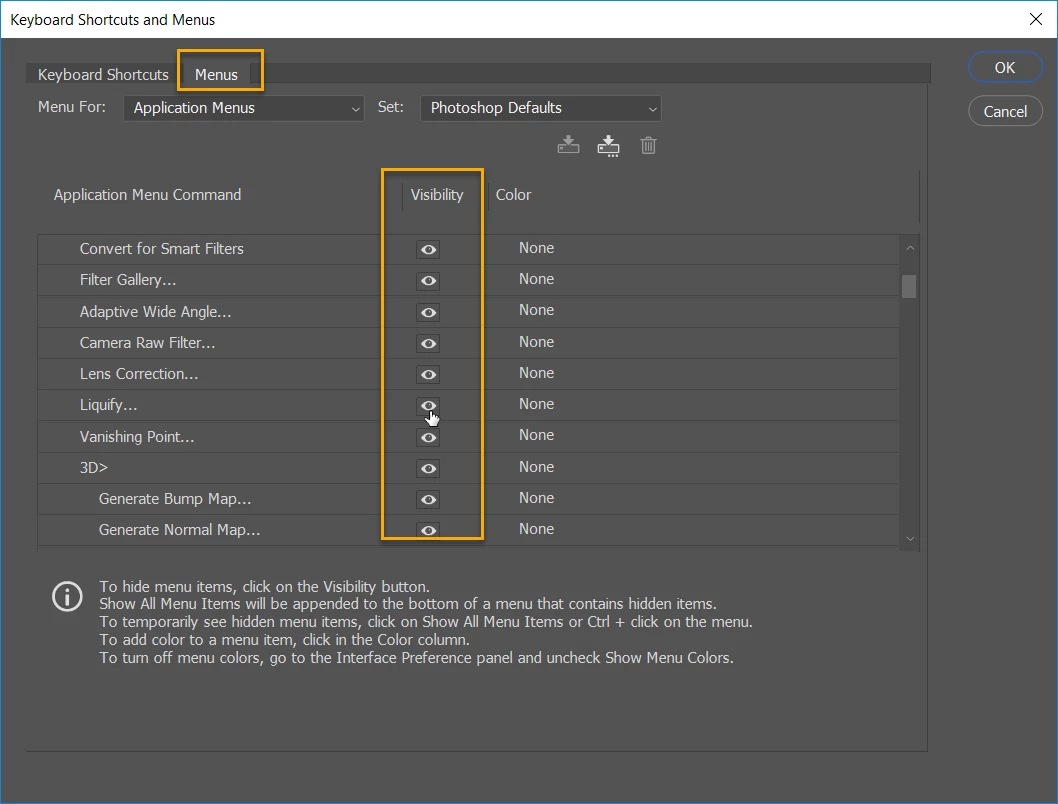
you can search for the filter's name in Drive C and delete it, or you can Hide the filter from the filter menu,

go to Edit -> keyboard shortcuts and menu, see screenshot below

1 reply

Mohammad.Harb
Community Expert
Mohammad.HarbCommunity ExpertCorrect answer
Community Expert
April 29, 2018

you can search for the filter's name in Drive C and delete it, or you can Hide the filter from the filter menu,

go to Edit -> keyboard shortcuts and menu, see screenshot below

robertakayne
Participating Frequently
April 30, 2018

Wow, thank you so much!  That worked by going to Edit>Keyboard Shortcuts!!