
greless
Inspiring
May 8, 2019
Answered

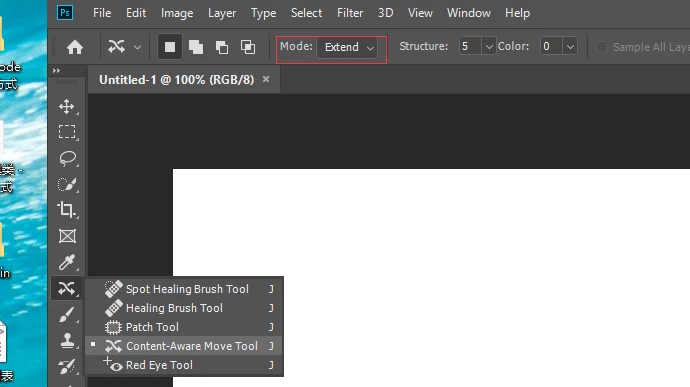
How do I set the content-aware move tool mode to move

  • May 8, 2019
  • 2 replies
  • 1814 views

hi,everybody,

     How do I set the content-aware move tool mode to move?
    

This topic has been closed for replies.
Correct answer r-bin

// select tool

var r = new ActionReference();

r.putClass(stringIDToTypeID("recomposeSelection"));

var d = new ActionDescriptor();

d.putReference(stringIDToTypeID("null"), r);

executeAction(stringIDToTypeID("select"), d, DialogModes.NO);

// set option

var r = new ActionReference();

r.putProperty(stringIDToTypeID("property"), stringIDToTypeID("tool"));

r.putEnumerated(stringIDToTypeID("application"), stringIDToTypeID("ordinal"), stringIDToTypeID("targetEnum"));

var ret = executeActionGet(r);

var options = ret.getObjectValue(stringIDToTypeID("currentToolOptions"));          

var tool = ret.getEnumerationType(stringIDToTypeID("tool"));

options.putInteger(stringIDToTypeID("recomposeMode"), 2); // or 1 for move

var r = new ActionReference();

r.putClass(tool);

var d = new ActionDescriptor();

d.putReference(stringIDToTypeID("null"), r);

d.putObject(stringIDToTypeID("to"), stringIDToTypeID("null"), options);

executeAction(stringIDToTypeID("set"), d, DialogModes.NO);

2 replies

r-binCorrect answer
Legend
May 11, 2019

// select tool

var r = new ActionReference();

r.putClass(stringIDToTypeID("recomposeSelection"));

var d = new ActionDescriptor();

d.putReference(stringIDToTypeID("null"), r);

executeAction(stringIDToTypeID("select"), d, DialogModes.NO);

// set option

var r = new ActionReference();

r.putProperty(stringIDToTypeID("property"), stringIDToTypeID("tool"));

r.putEnumerated(stringIDToTypeID("application"), stringIDToTypeID("ordinal"), stringIDToTypeID("targetEnum"));

var ret = executeActionGet(r);

var options = ret.getObjectValue(stringIDToTypeID("currentToolOptions"));          

var tool = ret.getEnumerationType(stringIDToTypeID("tool"));

options.putInteger(stringIDToTypeID("recomposeMode"), 2); // or 1 for move

var r = new ActionReference();

r.putClass(tool);

var d = new ActionDescriptor();

d.putReference(stringIDToTypeID("null"), r);

d.putObject(stringIDToTypeID("to"), stringIDToTypeID("null"), options);

executeAction(stringIDToTypeID("set"), d, DialogModes.NO);

JJMack
Community Expert
Community Expert
May 11, 2019

That is a much better way then requiring a tool preset.  Still Reset tool should set the tools option mode to some default setting.

JJMack
JJMack
Community Expert
Community Expert
May 9, 2019

Create a tool Preset for the content aware Move tool where mode is et to move.  Then in your script  Select the Conten aware Move tool to make it the current tool. Then select tool preset "content aware move tool mode move"

selectTool("recomposeSelection");                         // Content Arare Move Tool

selectToolPreset("Content-Aware Move Tool Mode Move");    // Mode move

// =================================================== Helper functions ===================================================== //

function selectTool(tool) {

    var desc9 = new ActionDescriptor();

        var ref7 = new ActionReference();

        ref7.putClass( app.stringIDToTypeID(tool) );

    desc9.putReference( app.charIDToTypeID('null'), ref7 );

    executeAction( app.charIDToTypeID('slct'), desc9, DialogModes.NO );

};

function selectToolPreset(PresetName) {

var desc = new ActionDescriptor();

var ref = new ActionReference();

ref.putName( stringIDToTypeID( "toolPreset" ), PresetName );

desc.putReference( charIDToTypeID( "null" ), ref );

executeAction( charIDToTypeID( "slct" ), desc, DialogModes.NO );

}

JJMack
greless
grelessAuthor
Inspiring
May 10, 2019

thank you,That's one way to do it.i wanted to reset all tools  but the mode of the content-aware move tool  not reset,it may be a bug in photoshop. so i need other method.

JJMack
Community Expert
Community Expert
May 10, 2019

Please report the reset bug to Adobe on their feedback site Photoshop Family Customer Community

JJMack
