
yukit66145825
Participant
May 3, 2018
Answered

How do i stop the Pen Tool from auto-drawing a backwards line?

  • May 3, 2018
  • 2 replies
  • 781 views

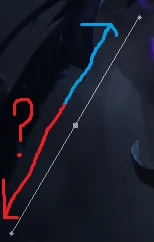
I am not sure what i am doing wrong but every time i use the pen tool in Photoshop CS6 it automatically draws a double line including a backwards and i can't make it stop doing that. I have been trying to crop some stuff while doing motion graphics tutorials but this happens.
    This topic has been closed for replies.
    Correct answer davescm

    The pen tool draws a path and those extra lines are not part of the path they are control handles which are positioned when you drag a point. They are used to change the shape of any curve in the line.

    See here - drawing with the pen tool : Draw with Pen tools in Photoshop

    Dave

    2 replies

    davescm
    Community Expert
    davescmCommunity ExpertCorrect answer
    Community Expert
    May 3, 2018

    The pen tool draws a path and those extra lines are not part of the path they are control handles which are positioned when you drag a point. They are used to change the shape of any curve in the line.

    See here - drawing with the pen tool : Draw with Pen tools in Photoshop

    Dave

    c.pfaffenbichler
    Community Expert
    Community Expert
    May 3, 2018

    You might be mistaking the bezier handles for the Path itself.

    The bezier handles define the curvature of the Path between two Path Points.