Participant
February 15, 2020
Question

How do I unlink this?

  • February 15, 2020
  • 2 replies
  • 1872 views

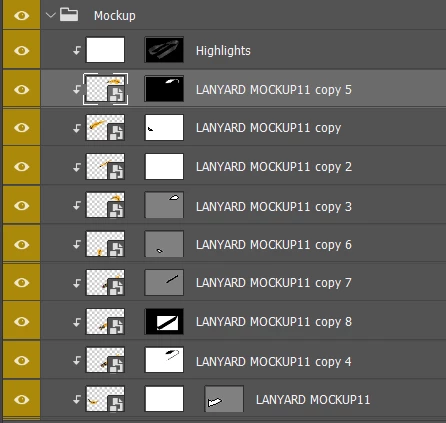
I want to use different files in these .psb files but I can't. If I change one, change all. Is there any way to unlink this?

 

This topic has been closed for replies.

2 replies

JJMack
Community Expert
Community Expert
February 15, 2020

There is no standard mockup template design.  What you show in that part of your mockup template  layers palette for a mockup layer group does not look like it would be useful in a mockyp template.9 modification to a Lanyard.   If that Lanyard is not a constant in All your  repopulated mockups it would be importable to replace the Lanyard would an other lanyard for all the Layer mask are are for the shared smart object lanyard in the template. The Layer mask on copy 2 look like it would negate all the layer  mask on the lower copies in the layers stack if the layers opacity and fill is 100% and the blending mode is normal.  What does the rest of your template look like?


I think you should download some free mockup templates toe see how others have designed their mockup templates and read how to user them.  If you need help you should upload your PSD template a post a link to it so others can see your mockup template and help you with your design.

JJMack
Chuck Uebele
Community Expert
Community Expert
February 15, 2020

Right click on the layer in the layers panel that you want to change. Select "Smart Object via copy." This will create a duplicate of that layer, but the smart object won't be linked to the other similar smart objects. Then you can delete the original smart object layer.