Participant
February 25, 2018
Answered

How do I use my own photos?

  • February 25, 2018
  • 2 replies
  • 350 views

I am using the trial version.  However if I cannot use my own photos either from my library of pictures or from my all-in-one printer, I do not think I want to purchase this program.  I have tried to find the answer but I am truly a beginner.  I had PSP on my old computer but when it died, I no longer had it installed.  That was very simple for me to edit my own photos and to change or crop them.  I am so frustrated.

    This topic has been closed for replies.
    Correct answer Nancy OShea

    Where do you normally store photos --  on the cloud, on your computer's primary hard drive or an external drive? 

    I like to use Adobe Bridge to view my images.  Go to File > View in Bridge.  If you're on Windows with a typical set-up, your images are most likely located in C > Users > [your name] > Pictures.   Double click on the folder to open it. 

    Right-click on image in Bridge to open it in Photoshop.

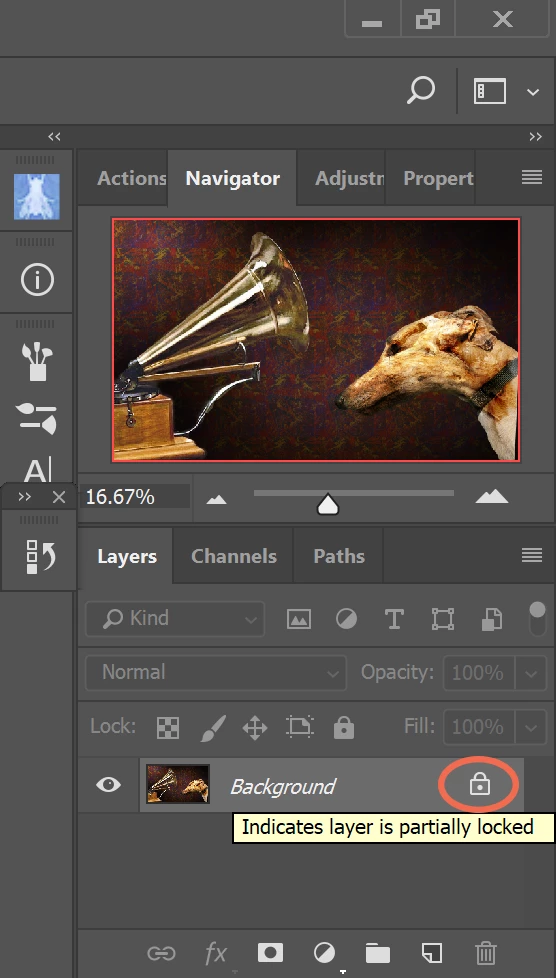
    Once the image is opened in Photoshop, you may need to unlock the layer by clicking the padlock icon in your layers panel.  See screenshot.

    NOTE:  It takes longer to explain this than it does to actually do it .

    Have fun!

    2 replies

    Nancy OShea
    Community Expert
    Nancy OSheaCommunity ExpertCorrect answer
    Community Expert
    February 26, 2018

    Where do you normally store photos --  on the cloud, on your computer's primary hard drive or an external drive? 

    I like to use Adobe Bridge to view my images.  Go to File > View in Bridge.  If you're on Windows with a typical set-up, your images are most likely located in C > Users > [your name] > Pictures.   Double click on the folder to open it. 

    Right-click on image in Bridge to open it in Photoshop.

    Once the image is opened in Photoshop, you may need to unlock the layer by clicking the padlock icon in your layers panel.  See screenshot.

    NOTE:  It takes longer to explain this than it does to actually do it .

    Have fun!

    Nancy O'Shea— Product User & Community Expert
    Peru Bob
    Community Expert
    Community Expert
    February 26, 2018

    Try File > Open from the Editor menu.