
qwazar1981
Participating Frequently
December 22, 2020
Question

How do i Warp a cylinder into a flat rectangle
  • December 22, 2020
  • 3 replies
  • 3037 views

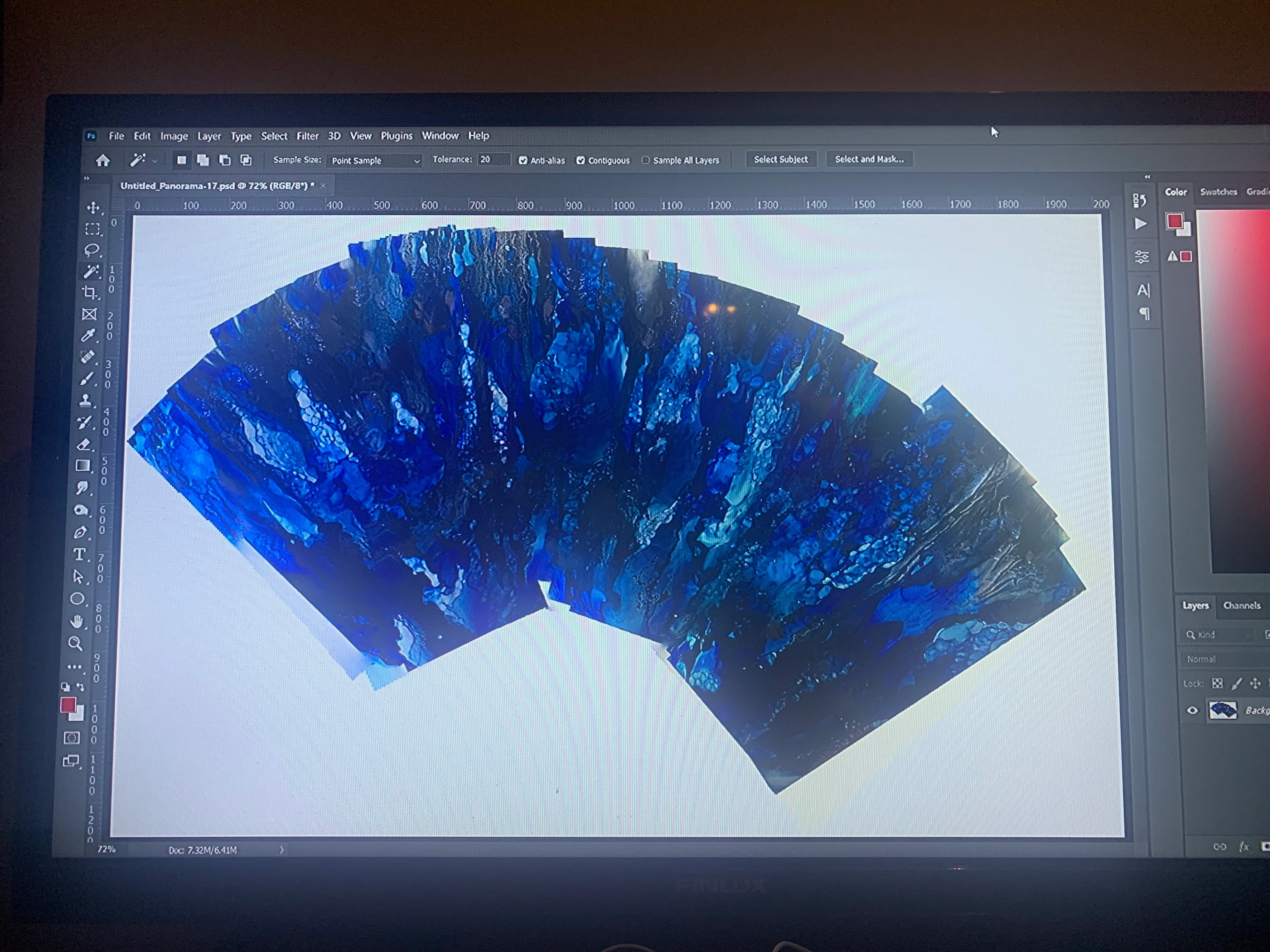
 Hi Everyone. So I painted a vase which is in a cylindrical (kinda) shape. And I thought I'd take pictures of it, side by side, and merge them into a rectangle. To show the whole scenery on one flat image. 
So I took a series of images and slowly merged them together into a collage using photomerge. 
it gave me this shape. 
Now I am stuck, because I have no idea how to efficiently and quickly warp this shape into a rectangle. 😕😕 

seriously stuck on this. 
Any ideas or hints?

maybe i should have approached the whole project differently.


let me know your thoughts. 

This topic has been closed for replies.

3 replies

Norman Sanders
Legend
December 23, 2020


While, on the one hand, I am very reluctant to suggest a solution I haven’t personally tried, on the other, I am tempted to tell you what I would try if I had the opportunity. It is this:


Photography:

Both camera and object on a vertical axis with the lens vertical and horizontal axis bisecting the object. Lighting tented to avoid blue hot spots appearing in highlights. Longer than normal focal length lens. Small -- not smallest -- aperture. 

The image above violates these shooting criteria but I used them to display the method because of the object's shape. The result of this technique should be evaluated in that context. For each exposure, rotate the object and assume you will be using only the middle third of the object in final image assembly.


Photoshop:

Perspective-Transform to expand the top half of each image and contract the lower half of the image to create a rectangle shape (head-on cylinder). This will avoid dead space in the areas adjacent to the neck of the vase. Expand horizontally and vertically to decompress the object and compensate for compression in the Transform command.  Final crop from top and stetch base to aid composition. (If the object is perfectly symmetrical, you may be able to stack the images as layers and apply the Transform to all rather than individually.) 


jane-e
Community Expert
Community Expert
December 22, 2020

Hi

You didn't say how you photographed the image.

  • Did you use a tripod and have lots of overlap?
  • Which settings (plural) did you try for the pano?
  • Did you move the camera or the object?

https://helpx.adobe.com/photoshop/using/create-panoramic-images-photomerge.html


~ Jane

qwazar1981
Participating Frequently
December 22, 2020

Tripod, I had a lot of overlap and i did move the vase on a lazy susan. Not the camera. 

Semaphoric
Community Expert
Community Expert
December 22, 2020

A suggestion I read recently was Put your vase on a turntable, and photograph it with the panorama setting on a smartphone.

qwazar1981
Participating Frequently
December 22, 2020

Brilliant! This might actually work way better. Then I'd have just to make minor adjustments. Might actually work way better

qwazar1981
Participating Frequently
December 22, 2020

Oh no this would not work of course. Because you'd have to rotate the camera not the vase. I'd need to create a whole infrastructure to make this work. But I think we might be on a path here.