Participating Frequently
January 10, 2018
Answered

How I can find the seamless pattern tile size?

  • January 10, 2018
  • 2 replies
  • 1706 views

Hey, guys!

Here is my problem. I created the pattern through the default photoshop script (Cross weaves).

So I have the canvas filled with this pattern, but how can I find the size of the pattern tile? Couse I want to save it for photostocks, but in the Preset Manager I can see only the size of initial element, from which the pattern was made.

Thanks!

This topic has been closed for replies.
Correct answer davescm

Hi

If a pattern is tiling on your image you can find it fairly easily by duplicating the layer - setting the blend mode of the top layer to difference then dragging the top layer across and down until it turns completely black. At that point it is repeating

Then drag across a couple of guides and read the tile size from the ruler (see example below)
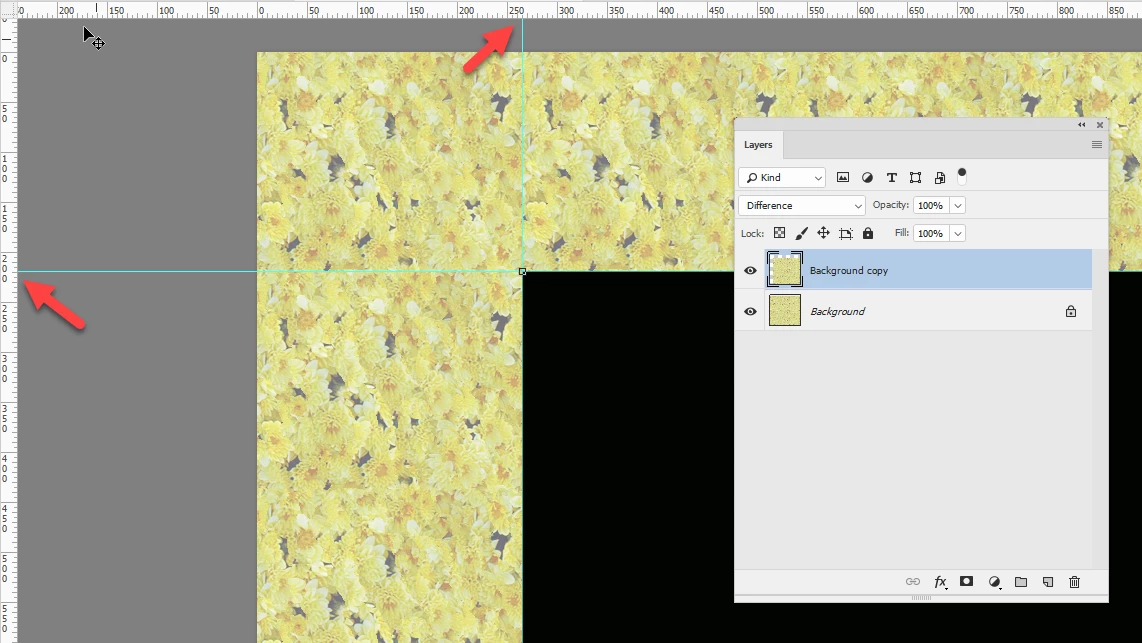
However , the script does not have to tile across the layer. Each small sub pattern in the example you gave can be in any of 2 rotations in a block of 4. So if your layer only has room for a block of 2x2 as below then there are 2x2x2x2 = 16 different ways of arranging those sub tiles.
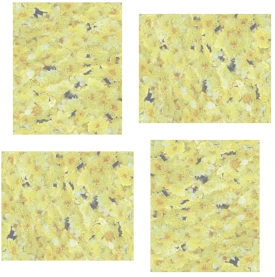
If you have room for 16 across x 16 down then that can be arranged in 2^256 =1.15 x10^77 (i.e. approx. 1 with 77 zeros after it). So that pattern may well not repeat i.e. be tiled on your layer.
The numbers get even bigger use the random brightness and color options.

Of course if you need to make a tile for use elsewhere you can do so by cutting the pattern where it is a close fit. Using Filter > Other >Offset to move the layer 50% down and 50% to the right, which moves the edges to the centre, then repairing any edges that do not match with the clone tool.

I hope that helps you

Dave

2 replies

davescm
Community Expert
davescmCommunity ExpertCorrect answer
Community Expert
January 11, 2018

Hi

If a pattern is tiling on your image you can find it fairly easily by duplicating the layer - setting the blend mode of the top layer to difference then dragging the top layer across and down until it turns completely black. At that point it is repeating

Then drag across a couple of guides and read the tile size from the ruler (see example below)

However , the script does not have to tile across the layer. Each small sub pattern in the example you gave can be in any of 2 rotations in a block of 4. So if your layer only has room for a block of 2x2 as below then there are 2x2x2x2 = 16 different ways of arranging those sub tiles.

If you have room for 16 across x 16 down then that can be arranged in 2^256 =1.15 x10^77 (i.e. approx. 1 with 77 zeros after it). So that pattern may well not repeat i.e. be tiled on your layer.
The numbers get even bigger use the random brightness and color options.

Of course if you need to make a tile for use elsewhere you can do so by cutting the pattern where it is a close fit. Using Filter > Other >Offset to move the layer 50% down and 50% to the right, which moves the edges to the centre, then repairing any edges that do not match with the clone tool.

I hope that helps you

Dave

c.pfaffenbichler
Community Expert
Community Expert
January 11, 2018

I had not noticed the flipping …

Participating Frequently
January 11, 2018

Wow, thanks so much!

I would never figure that out by myself

JJMack
Community Expert
Community Expert
January 11, 2018

JJMack
Participating Frequently
January 11, 2018

Thanks, but It's not working (
As I said in Preset Manager I can see only size of initial little element, but not the final pattern tile.

So here is my pattern and what I can see in Preset Manager.

c.pfaffenbichler
Community Expert
Community Expert
January 11, 2018

Would that not have to be (short side + long side) by (short side + long side)?