
Laurence-Baker
Known Participant
June 4, 2020
Answered

How is the luminosity value of the Composite channel calculated?

  • June 4, 2020
  • 2 replies
  • 2068 views

Taking an individual pixel in the Composite channel is it a mathematical mean of the three channels luminosity, or is some other method used?


Thanks

Laurence.

 

This topic has been closed for replies.
Correct answer D Fosse

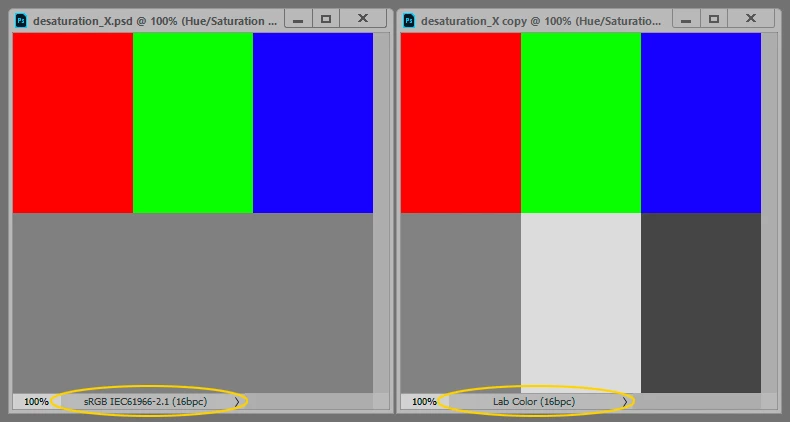
No, it is not the average value. That would result in dark values for yellows and light for purples.


It is very closely related to the L channel in Lab, but it's not identical. Nobody really knows why it differs from Lab L in the first place, because that would have been a very natural reference. No documentation has ever been released. I suspect it's just an ad hoc-modification to make it more visually consistent. After all, it's just for internal use in Photoshop, so it doesn't have to match any standard.


But for most practical purposes you can think of it as Lab L. The main characteristic of this model is that it takes into account the inherent lightness of each color, so that yellow remains a light value and purple remains a dark value.
2 replies

Stephen Marsh
Community Expert
Community Expert
June 4, 2020

Fill an image with black, white or a neutral R=G=B value and fade/blend to Color blend mode. RGB based luminosity values are also found on the master curve and layer option blend-if sliders.


The official formula can be found here, for what it is worth:


https://www.adobe.com/content/dam/acom/en/devnet/pdf/pdf_reference_archive/blend_modes.pdf


Laurence-Baker
Known Participant
June 5, 2020

Thank you. I didn't think it would be simple...

D Fosse
Community Expert
D FosseCommunity ExpertCorrect answer
Community Expert
June 4, 2020

No, it is not the average value. That would result in dark values for yellows and light for purples.


It is very closely related to the L channel in Lab, but it's not identical. Nobody really knows why it differs from Lab L in the first place, because that would have been a very natural reference. No documentation has ever been released. I suspect it's just an ad hoc-modification to make it more visually consistent. After all, it's just for internal use in Photoshop, so it doesn't have to match any standard.


But for most practical purposes you can think of it as Lab L. The main characteristic of this model is that it takes into account the inherent lightness of each color, so that yellow remains a light value and purple remains a dark value.

Laurence-Baker
Known Participant
June 5, 2020

Thank you for your detailed reply. Time to read up on Lab colour space....