myronm79299567
Inspiring
April 27, 2017
Answered

How to add yellow outer glow to person

  • April 27, 2017
  • 2 replies
  • 1580 views

Hi! I'm trying to add an outer glow to a person set against a white background. (so i have already deleted the original background using the majic wand).

Also my paint bucket tool seems to be hidden and i do not have a colour selector option in the blending options window?

Please help ASAP

    This topic has been closed for replies.
    Correct answer Bettina Di Virgilio

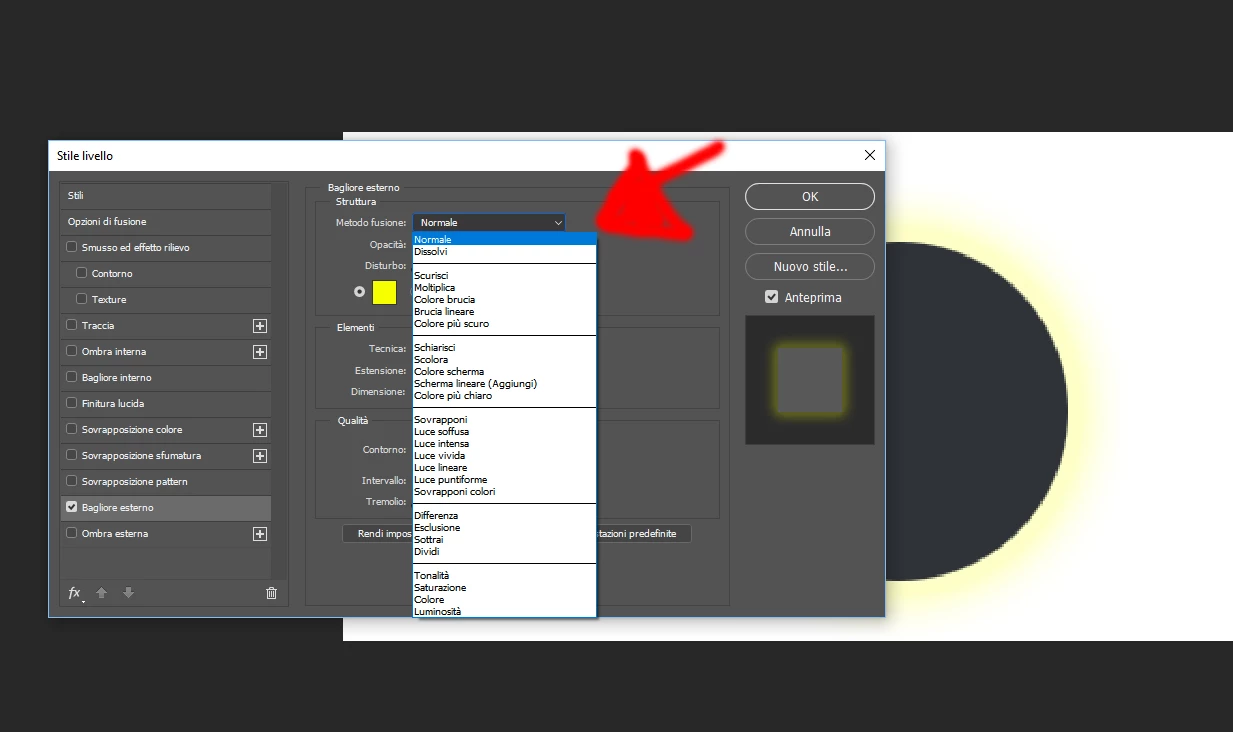
    Hello, first of all the outer glow looks disabled in the layer style panel: on the list of the Styles clic on Outer Glow to switch in on and access to the parameters of the Glow.

    Once you're in the parameters, choose color you want for your glow. Then, since you're using a white background, I suggest you to choose "normal" as a bending mode, because the mode that Photoshop will set as the default will work only on dark bacgkrounds.

    2 replies

    c.pfaffenbichler
    Community Expert
    Community Expert
    April 27, 2017

    You have apparently not yet set the Outer Glow (check the checkbox), then select it to change the Colour and Blend Mode.

    myronm79299567
    Inspiring
    April 27, 2017

    I have done all that still nothing happening with the glow on the actual photo.

    I just want a glow around the border of the person.

    Thanks

    K´mo
    Participating Frequently
    April 27, 2017

    Your opacity is 0, adjust it higher.

    Bettina Di Virgilio
    Bettina Di VirgilioCorrect answer
    Participating Frequently
    April 27, 2017

    Hello, first of all the outer glow looks disabled in the layer style panel: on the list of the Styles clic on Outer Glow to switch in on and access to the parameters of the Glow.

    Once you're in the parameters, choose color you want for your glow. Then, since you're using a white background, I suggest you to choose "normal" as a bending mode, because the mode that Photoshop will set as the default will work only on dark bacgkrounds.