
Participant
June 21, 2017
Answered

How to Apply a Gradient Fill to Strokes in photoshop

  • June 21, 2017
  • 2 replies
  • 13573 views

Hello,

Does there is any way to apply gradient effect to a path like it is possible to apply brush to a stroke path?

I would like to create a gradient effect that shape according to the path I created.

I know that it is possible in Illustrator, but I didn't find how to do it in Photoshop.

I would like to create a similar effect that you can find in the first picture at this link: How to Apply a Gradient Fill to Strokes in Adobe Illustrator CS5 and Earlier - Astute Graphics
This topic has been closed for replies.
Correct answer c.pfaffenbichler

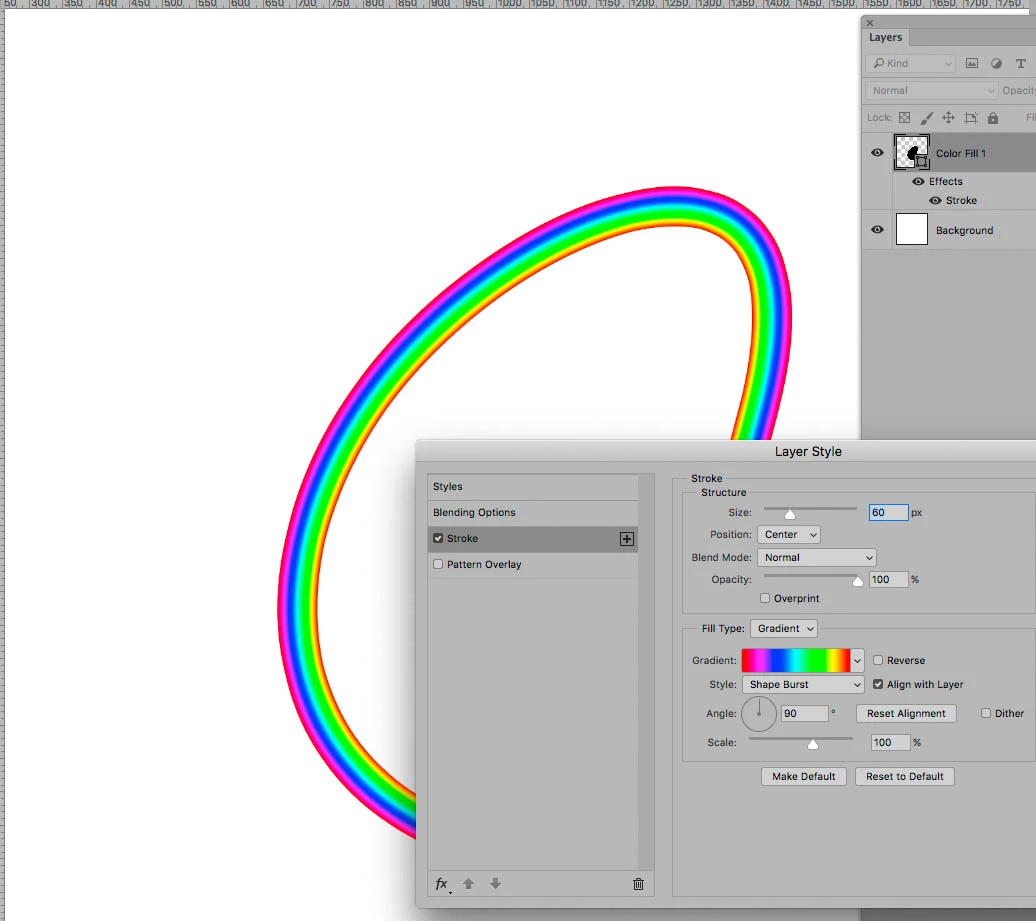
A Gradient perpendicular to the Path could be simulated with Layer Style Stroke set to Gradient and Shape Burst.

Edit:

For Gradients along the the Path just use Illustrator, some destructive work-arounds in Photoshop might be feasible but be a waste of time.

2 replies

Semaphoric
Community Expert
Community Expert
June 21, 2017

If you want the Gradient to run along the length of the stroke, yo0u can put a Gradient Map layer above an empty layer, and make a Clipping Mask. Then stroke your path with the Brush in the empty layer using the default black and white Foreground and Background colors, and in the Brush panel, under Color Dynamics, set the Foreground Background Jitter control to fade. The value to use depends on the length of your path, and may take some tweaking to get it just right.

Not enough, just right, and too much:


c.pfaffenbichler
Community Expert
c.pfaffenbichlerCommunity ExpertCorrect answer
Community Expert
June 21, 2017

A Gradient perpendicular to the Path could be simulated with Layer Style Stroke set to Gradient and Shape Burst.

Edit:

For Gradients along the the Path just use Illustrator, some destructive work-arounds in Photoshop might be feasible but be a waste of time.

davescm
Community Expert
Community Expert
June 21, 2017

If you do need to use Photoshop for a gradient along the path you could create a shape with a gradient stroke

Dave

Semaphoric
Community Expert
Community Expert
June 21, 2017

That's good to know, Dave. I'd always assumed that a gradient stroke on a shape would just be an overlay, not along the length, so I never tried it.