RajneshD
Inspiring
December 6, 2018
Answered

How to Clip Several Layers to a single Shape?

  • December 6, 2018
  • 1 reply
  • 1029 views

Greetings,

     I'm using Photoshop CC 2019 on a Macbook Pro.

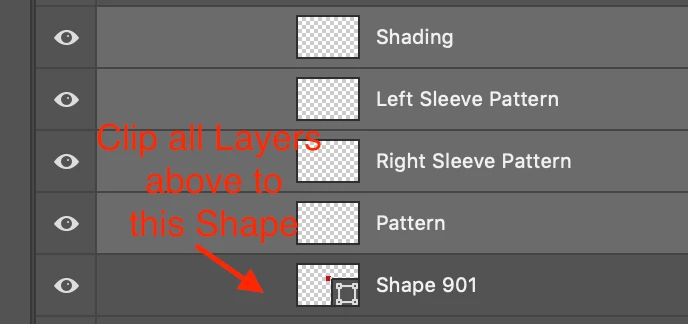
     I'd like to Clip several Layers (perhaps also several Groups) to a single Shape layer below them.

     Photoshop only seems to allow me to Clip one Layer by the Layer immediately below it.

     I've attached an Image for clarity. Thanks in advance for your reply.

Regards,

Rajnesh
This topic has been closed for replies.
Correct answer davescm

Hi

You can either

1. Clip them one at a time by Alt clicking on the border between each and the layer below (if you start with the bottom pair the others will all clip to the bottom layer

or


2. Highlight all the upper  layers - right click and choose Create clipping mask

Dave

1 reply

davescm
Community Expert
davescmCommunity ExpertCorrect answer
Community Expert
December 6, 2018

Hi

You can either

1. Clip them one at a time by Alt clicking on the border between each and the layer below (if you start with the bottom pair the others will all clip to the bottom layer

or


2. Highlight all the upper  layers - right click and choose Create clipping mask

Dave

RajneshD
RajneshDAuthor
Inspiring
December 6, 2018

Thank you, Dave.

That worked!