
Participant
March 14, 2019
Question

How to do a duotone with transparency?

  • March 14, 2019
  • 2 replies
  • 2439 views

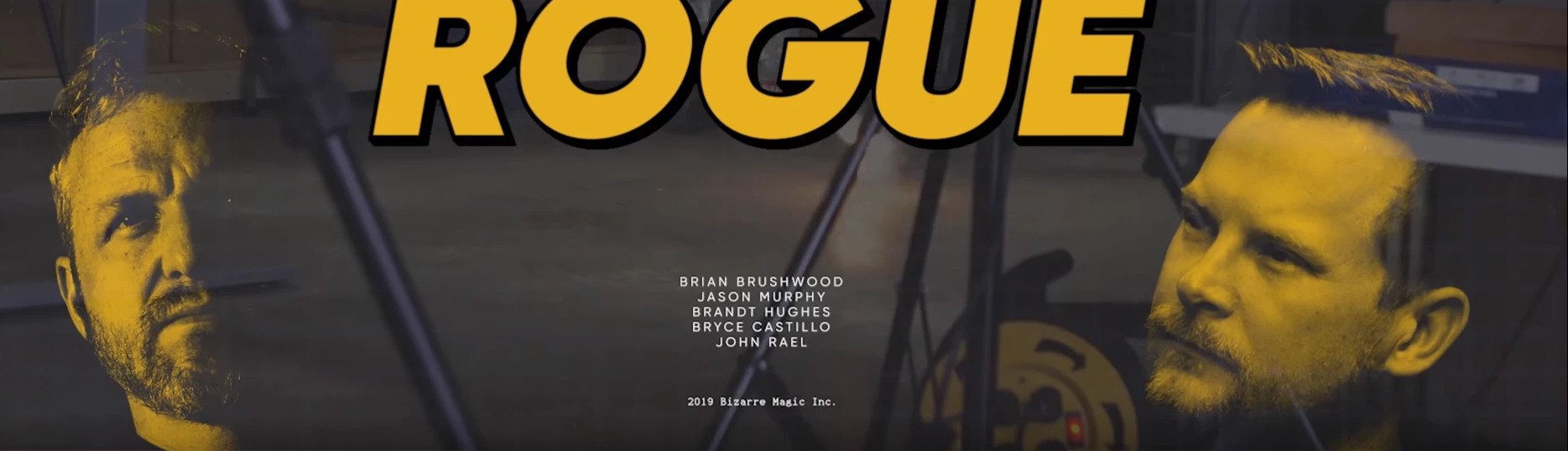
I'm not even sure duotone is the right word. The effect I'm looking for is below. The faces are highlighted in yellow, and the contrast is transparent.

If someone can point me to a video tutorial or even help me word my searches correctly, I'd appreciate it.
    This topic has been closed for replies.

    2 replies

    Legend
    March 15, 2019

    In Photoshop, a duotone is an image for printing (not screen display) with black and one other colour ink. So black and red could be a duotone; the person running the printing press would add a bucket of special red ink for your project.

    Otherwise, it isn't a duotone (for example for screen view, or printing on a desktop printer). Some creative people may use the duotone features to get the effect they want, then go back to their real colour space (Lab, RGB or CMYK) for the final result.

    So, when you're making the transparency, the chances are you aren't using a duotone. If you were, not sure what you'd do: it depends on your deliverable, which must be one of EPS, DCS2 or duotone.

    Mylenium
    Legend
    March 15, 2019

    Nothing specific here. Juist a custom channel used as a layer mask and the faces then having been colored e.g. with a color overlay layer style. Have a look at the Channels palette and functions like Image --> Calculations.

    Mylenium