
Inspiring
May 19, 2010
Answered

How to Draw a Circle to Exact Dimension

  • May 19, 2010
  • 2 replies
  • 72768 views

Hi,

How to I draw a circle in CS4 Ps to exactly 202mm?

I know the Elipise tool> Shift+Drag (for a perfect circle selection) but not how to type in an exact diameter — is there a function for this in CS4?

I would actually prefer to draw the circle in a Vector path if this is possible.

I have Illustraor, but clueless how to get the path over to Ps...

Thanks in advance.
    This topic has been closed for replies.
    Correct answer

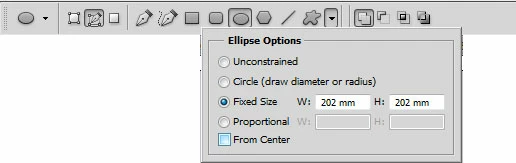
    Yes, using the ellipse tool set for paths.

    Where is says fixed size, just type 202mm in each box.

    MTSTUNER

    2 replies

    Correct answer
    May 19, 2010

    Yes, using the ellipse tool set for paths.

    Where is says fixed size, just type 202mm in each box.

    MTSTUNER

    Inspiring
    May 19, 2010

    I believe that nailed it, thank you

    The Info Pallet gave me exact X-Y center point, with "From Center" also checked, one click popped my circle into registration...nice Adobe engineering.

    Inspiring
    May 19, 2010

    Okay, I got the Pen tool> ToolBar: Elipise> Shift+drag

    Still not sure how to get an exact diameter...

    toxic waltz
    Participating Frequently
    May 19, 2010

    Well I would start of with a document that is 202mm x 202mm.

    Snap some guides to the center.

    Draw a cricle with the selection tool.