
Participant
December 11, 2017
Question

how to get brushes into BrushBox?

  • December 11, 2017
  • 2 replies
  • 1570 views

I downloaded and installed the BrushBox extension, but none of my brushes are there... is there something I have to do to load them or something? I feel dumb asking because I've tried everything I can think of, but my brushes are nowhere to be found.
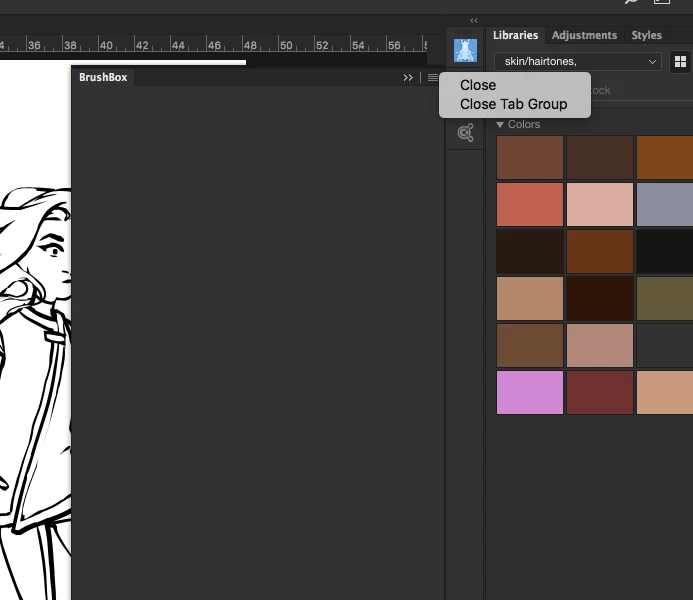
There are no options for loading or importing brushes... the extension is there in photoshop, what else do I have to do?  (And yes, I've been through the user guide and FAQ... the user guide make it look like brushes should be automatically loaded into BrushBox without any extra steps.  Is that right?)

El

This topic has been closed for replies.

2 replies

Trevor.Dennis
Community Expert
Community Expert
December 12, 2017

Derrick has an Adobe ID and sometimes posts here, so it might be useful if he describes the steps to fix your issue on this forum so that other people can benefit.

https://forums.adobe.com/people/Derrick%20Barth

Thanks Derrick

JJMack
Community Expert
Community Expert
December 12, 2017

That not Adobe software the information should be available on the developer web site BrushBox - A better preset manager for Adobe Photoshop

Not compatable with other 3rd party preset managers.

Photoshop CC 2018 also made many brush UI chages now you can group brushes.    These changes may change what happen by default in that extenstion.  Check that web site. It stated it works with CC 2018.

http://derrickb.net/brushbox/userguide.pdf

JJMack