saranr37921948
Known Participant
May 15, 2017
Question

how to get stitich or embroidery effect in photoshop or illustrator

  • May 15, 2017
  • 5 replies
  • 5920 views

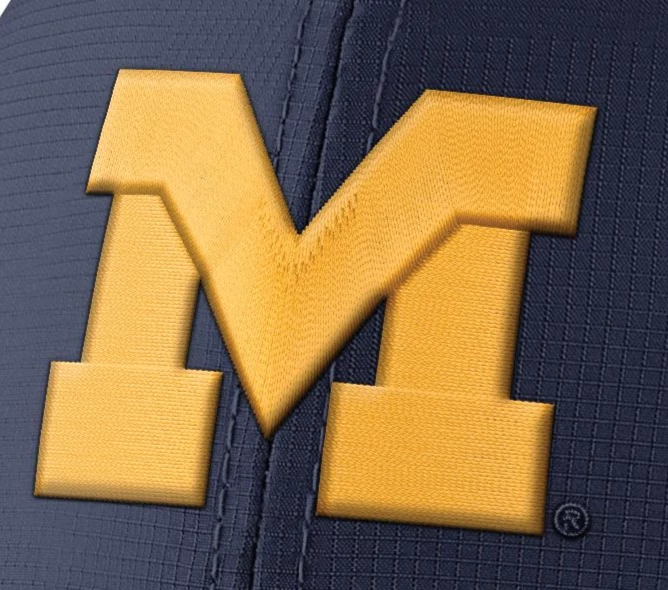
Hi friends, can you please help to get the stitch effect in photoshop or illustrator..

example attached here.. please help me on this .

thanks in advances.
    This topic has been closed for replies.

    5 replies

    saranr37921948
    Known Participant
    May 16, 2017

    I will try is not coming stitching effectffect

    davescm
    Community Expert
    Community Expert
    May 16, 2017

    Hi

    I missed this last night - so had to have a go today using 3D.

    The shape is just an extrusion with a shallow depth.

    The bevel on the edge is set in the object properties and I used the inflate property to give the surface a bit of a curve.

    The material is just a cotton weave texture (which is downloadable from Adobe using "3D - Get More Content")

    For the "M", I built 2 objects, one for the top and 1 for the legs, and combined them in one 3D layer - that way the bevel went round the top and the bottom parts.

    To use these in a composite either switch off the ground shadow or rotate the object and camera so that it is lying flat on the ground.

    I hope that helps you.

    Dave

    saranr37921948
    Known Participant
    May 16, 2017

    thank you for your help

    I need stitch effect

    example

    Trevor.Dennis
    Community Expert
    Community Expert
    May 15, 2017

    I 'really' hate to admit defeat, but I think this might have done with Illustrator.  I was unable to get the sharp corner on the inside corner of the crossbar, and I eventually gave using layer styles and resorted to Alien Skin Eye Candy 7 (bevel)

    This is what I managed with Layer Styles, but I had to resort to setting Highlights to black (multiply) the same as the shadows.  I think the Alien Skin version above made a better bevel though.  Of course I could have done it all manually, but that would take a bit of time.

    In both instances I added the canvas texture outside of Layer Styles because I couldn't scale it the way I wanted, but making the layers SOs and using Filter Gallery made that straight forward. 

    Using Render Fibers might give a better texture — especially if you added Lighting effects to it.  An interesting challenge all round.

    saranr37921948
    Known Participant
    May 16, 2017

    I will try is not coming this effect

    kindly advise

    postrophe
    Inspiring
    May 15, 2017

    Hi

    Search Google for : how to create stitches with photoshop

    many turials

    Pierre

    melissapiccone
    Community Expert
    Community Expert
    May 15, 2017

    I think you mean the M - I would use layer styles. Add a texture in there to make it look like the one in the photo. Use 3 different shapes for this - the top part of the M and the 2 legs, each with with their own layer/style.

    Melissa Piccone | Adobe Trainer | Online Courses Author | Fine Artist
    JJMack
    Community Expert
    Community Expert
    May 15, 2017

    Using the Pen in shape layer mode you may be able to create stitch line shape layers. To these you could add layer styles and blending.  With some work and practice you may be able to simulate stitching. A quick try without adding styling and blending.

    JJMack