Participant
March 21, 2020
Question

How to make these thumbnails?

  • March 21, 2020
  • 1 reply
  • 508 views

Hi everyone,


I'm new to Photoshop CC 2019 and I use it for my YouTube channel to make thumbnails.

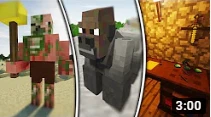
I was wondering how you can divide multiple layers with a diagonal line like in these thumbnails I attached. Many thanks for your help!



This topic has been closed for replies.

1 reply

c.pfaffenbichler
Community Expert
Community Expert
March 21, 2020

You could use the Pen Tool (or Rectangle Tool, Ellipse Tool, …) to create white Shape Layers and apply a black Stroke to it. 

Edit: 

Participant
March 24, 2020

Thank you very much!

c.pfaffenbichler
Community Expert
Community Expert
March 24, 2020

Another Option would be creating a Shape Layer with a white Stroke and no Fill and applying the Layer Style Stroke with a black line to it. 

That might offer advantages (the thickness of the white lines could be echanged simultaneously) but also a drawback (when it contains multiple open subPathItems those get closed).