M.Jackson93
Participant
October 5, 2017
Question

How to photoshop wine into wine glass?

  • October 5, 2017
  • 6 replies
  • 11937 views

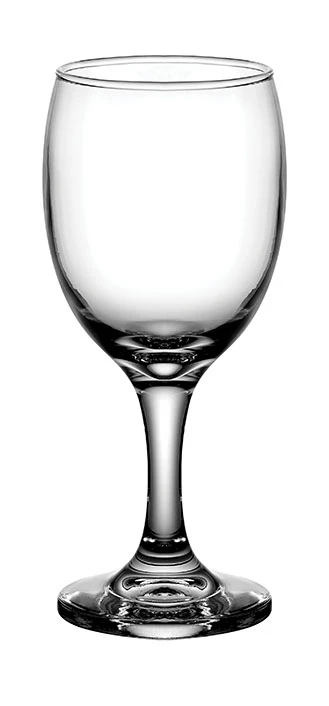
I am doing a project where I need to put realistic wine into a photo of a wine glass, what steps would I go through to achieve this feat?

    6 replies

    D Fosse
    Community Expert
    Community Expert
    October 6, 2017

    Guys!! This would be very much frowned upon in the more...elevated strata of society. I know you all like wine, but...really...pour another glass if you want more...

    davescm
    Community Expert
    Community Expert
    October 6, 2017

    ......and I always thought that the right glass was just one that doesn't leak !

    Dave

    D Fosse
    Community Expert
    Community Expert
    October 6, 2017

    That seems like a healthy principle   To be honest, Dave, I'm allergic to snobbery of any kind, and there's plenty of that when it comes to wine. I'd take a can of beer any day, if it wasn't for the fact that I live an hour's drive outside the city, and I can't get anywhere without my car. So I hardly touch the stuff these days.

    Aside from that, I must confess I like Trevor's version. That's only because I'm a photographer. I don't care about drinking it, just shooting it, and something like this has to be done with backlight plus a large softbox to one side, just to give some contour to the glass. It's a bit of a cliche, but it works. You get both the shape of the glass, and the deep transparent color of what's in it.

    davescm
    Community Expert
    Community Expert
    October 6, 2017

    That's the trouble with living in the UK. I was asleep when all this was going on, and missed out on the fun

    So being late to the party - I filled it with white.

    Same techniques as the others - but I used a duplicate wine body layer with hard light to brighten the edges, and I sharpened up the glass interior (painted black brush) to make the wine clearer. I also added a bit of the wine colour into the glass reflections

    Where blending modes were anything but normal I have shown them on the layer

    Dave

    Trevor.Dennis
    Community Expert
    Community Expert
    October 6, 2017

    There's a lot to be said for imitating reality, so find something that looks close to what you are looking for with lighting that matches your scene, and use it to set up a custom gradient.

    You'll need something to clip the gradient fill to, so outlined that with the pen tool, Ctrl click the path to load as a selection, and copy to new layer from the glass layer.  This gives us more options later on.

    Make a new layer, and run your custom gradiant across it.  Note I set up a selection to do this.  This makes it easier to warp the gradient layer to the glass.

    OK, clip the g5radient layer to the copied glass layer, and Free Transform > Warp the gradient to flollow the shape of the glass

    To finish off, I copied the glass area again, and moved it to the top of the stack.  This breaks the clipped layer arrangment, so fix that be reclipping.  Then set the top layer blend mode to Multiply, which shows the glass texture through the wine.

    Note I have cheated with the perspective to keep things simple.

    [EDIT]  Blimey!  Looks like everyone has had a crack at this at the same time.

    rayek.elfin
    Legend
    October 6, 2017

    Trevor.Dennis  wrote

    [EDIT]  Blimey!  Looks like everyone has had a crack at this at the same time.

    It's a nice little quick project, that's why. Fun to work on as a distraction from 'real' work for a couple minutes ;-P

    I think a combination of yours and Chucks, with real photo materials and masking (like mine), will bring the best results.

    [Edit] Damn, multiply blend mode! I could've spared me the trouble of using the round-trip to Krita. Multiply blending will work just as well in this case (white background). Sigh.

    Trevor.Dennis
    Community Expert
    Community Expert
    October 6, 2017

    One of the great things about posting here is that it keeps you sharp.  I actually forgot how to do dashed lines a few days ago, and had to really think about it!   Then again, I forget who I am sometimes, so fair dos.

    rayek.elfin
    Legend
    October 5, 2017

    1) remove white background. (best done with a unmultiply method - use Krita or Gimp for this, because Photoshop doesn't have this option, nor seems plugin to be available anymore) Krita's version is called "Color to Alpha". Perform this step in Krita, and open the result in Photoshop.

    2) add white solid background layer

    3) Google a good reference image. For example: Wine glass png #31799

    4) between the white background and the transparent glass layer, insert a base shape with an elliptical gradient. Match this with the amount of wine you need. Shape it according to the shape of the glass and the reference image. Two colours for this gradient: the center dark and the outer lighter red. Sample these colours from the reference image and use them in your gradient.

    5) Create the outer dark/black areas. Keep adding more details, such as the fine lighter edge effects on both sides.

    6) add the details for the reflections. Keep referring visually to the original reference image. Shapes with gradients, and lines that you blur will work quite well.

    Done!

    Or (simpler)

    1) grab the part of the reference wineglass with the fluid. Use layer masks to refine that selection. Copy to Krita.

    2) Use Krita's Color To Alpha, but preserve the important white reflections. Paste back into Photoshop.

    3) use transformation and liquify to fit the fluid in the empty glass.

    Or use Blender for more advanced fluid effects (warning! Advanced approach!):

    Create a Wine Glass - Blender Fluid Simulation Tutorial! - YouTube

    Then composite the fluid with your glass. Or just recreate the glass in Blender.

    Method 2: three minutes work. Not perfect, but you get the basic idea. I added a quite white reflection at the bottom. I went too far with the white reduction at the fluid surface, but it's just a quick and dirty test.

    Krita is really a timesaver with its color to alpha option. Get it here: www.krita.org

    Chuck Uebele
    Community Expert
    Community Expert
    October 5, 2017

    make an oval for the top of the wine, select a color for your wine.

    Pen tool to create the rest of the wine in the glass, I slightly overlapped the two shape layers to give an edge. Set the blend mode to multiply

    Clip a white solid fill layer to the top of the wine, and add a mask to feather the white to look like a reflection of the background.

    Duplicate the main wine layer and adjust the opacity down to blend in sides of glass. Add a layer mask and feather bottom of glass to show more of it.

    Add a curves layer with a gradient on the mask to make it look like a little light is coming through the wine.

    the two overlapping shape layers set to multiply make the rim of the wine look dark. This can be adjusted by adding another layer to make it look like real liquid. Get a glass of wine and see how it actually looks.

    Peru Bob
    Community Expert
    Community Expert
    October 5, 2017

    One of the links here may help:

    how to Photoshop wine in an empty glass