emerydesignonline
Participating Frequently
December 17, 2019
Answered

How to Prevent Untabbed Files from opening in Upper Left Corner

  • December 17, 2019
  • 1 reply
  • 627 views

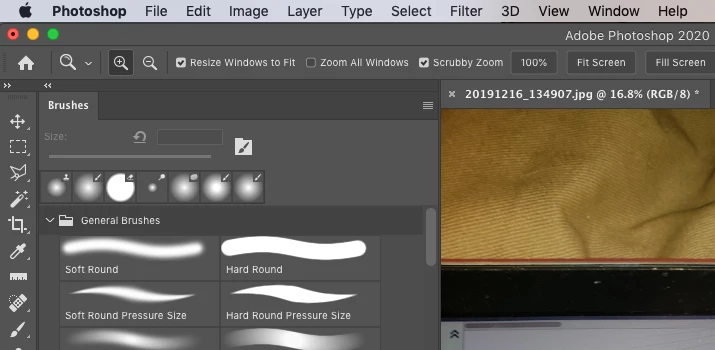
I have a problem with files opening in the upper left corner of my screen. I keep my brushes and tools in the upper left. 


Opened untabbed files are by default opening behind the palettes. Manually hiding my palettes or moving my open documents around is annoying and a waste of time. 


Also I use a Wacom Cintiq 22 HD so I have to move my arm across my screen every time. Would be best if I could have everything opening dead center or even on the upper right to reduce constant awkward movements. 


Is there a way to modify this? 


This topic has been closed for replies.
Correct answer gener7

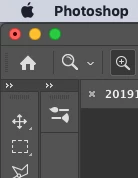
Yes. Dock your brushes panel to the Toolbar. In other words, drag your panel until you see a blue line, then release the mouse or trackpad button.

Files will then open to the right of the panel and won't cover it. It's best to work in Tabbed mode. I can't find a way to stop Windows from covering everything. Perhaps a dual monitor setup is best for that where you keep the tools on one monitor and the windows on another.


When you expand the panel, the file tab is pushed to the right. Any subsequent open files will be in that space.

You'll want to save that arrangement as a custom workspace.


You can do this for any panels and even the Toobar. You could dock the Toolbar on the right and docked needed panels on the left. Your panels will not cover your artwork and artwork should not cover the panels.

1 reply

gener7
Community Expert
gener7Community ExpertCorrect answer
Community Expert
December 17, 2019

Yes. Dock your brushes panel to the Toolbar. In other words, drag your panel until you see a blue line, then release the mouse or trackpad button.

Files will then open to the right of the panel and won't cover it. It's best to work in Tabbed mode. I can't find a way to stop Windows from covering everything. Perhaps a dual monitor setup is best for that where you keep the tools on one monitor and the windows on another.


When you expand the panel, the file tab is pushed to the right. Any subsequent open files will be in that space.

You'll want to save that arrangement as a custom workspace.


You can do this for any panels and even the Toobar. You could dock the Toolbar on the right and docked needed panels on the left. Your panels will not cover your artwork and artwork should not cover the panels.

emerydesignonline
Participating Frequently
January 7, 2020

Thanks for the quick response @gener7. 

This is working at the moment! Even with untabbed windows they are loading to the right of the Docked tools. 

Thanks you! 

Emery


gener7
Community Expert
Community Expert
January 7, 2020

You're very much welcome. Always good to hear it worked.