
Participant
July 27, 2018
Question

How to wrap an image on to 3D object (say a back cover on a phone)

  • July 27, 2018
  • 1 reply
  • 1844 views

Hi there,

I am trying to wrap an image on a phone back.

First of all i make selection with Pen tool of phone's back and make kinda template of it.

Then i place an image on template.

Going to Edit>Transform>Distort tool, i adjust the image's positions to match the edges of phone/template.

After that i create clipping mask of image to the template.

here is the screenshot for what i did.
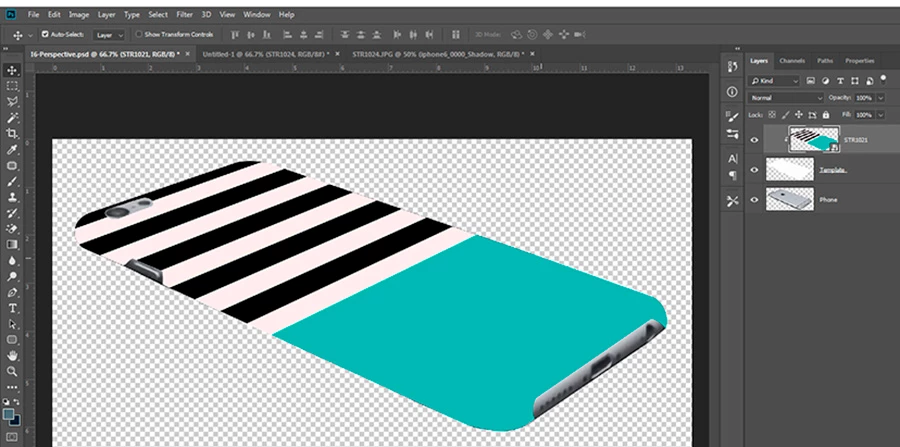
Its a bit tedious to work with every image. I know there is a better way to do this but could not be able to figure it out.

Also it doesn't look good in the result. I want the stripes of image should also bend with edge of phone to look realistic. I tried using warp tool and vanishing point filter but it doesn't seem to work with rounded or curved edges. Please help me.

Thanks in advance.

    This topic has been closed for replies.

    1 reply

    Mylenium
    Legend
    July 27, 2018

    The "better way" is to find a 3D model of the phone and render it with your image as a texture.

    Mylenium

    sanshrAuthor
    Participant
    July 27, 2018

    I have a lots of phone models so its very difficult to find each and every 3d model. Moreover, I don't have dedicated graphic card so 3D options won't work in my PC.

    davescm
    Community Expert
    Community Expert
    July 27, 2018

    Hi

    I am with Mylenium on this one. I would definitely do this in 3D which would take care of the curving round the edges as well as shadows (which are missing from your example).

    Changing the phone would simply  be changing the model and wrapping the same texture onto the new model.

    However, if you cannot use 3D you could try the following.

    1. Puppet warp (although I am not sure if that will be available without a GPU)

    2. A displacement map to bend the edge pixels

    If you can get the distortion right - you can paint in shadows on a separate layer set to multiply blend mode

    The above though would need a lot of careful positioning and be unique to each phone, so would need to be built each time - hence the advice to use 3D.

    If you cannot use Photoshop 3D due to lack of GPU try Blender which will run on a CPU (abeit very slowly). You could then bring the render back to Photoshop for finishing.

    Dave