Exit
  • Global community
    • Language:
      • Deutsch
      • English
      • Español
      • Français
      • Português
  • 日本語コミュニティ
  • 한국 커뮤니티
0

I am trying to add the copyright watermark for a small photography business. However, any time I type the alt+0169 (as I am on a Windows), the copyright image does not appear. Either nothing happens, or it shows up as a small dot. Why is the shortcut not

New Here ,
Feb 12, 2017 Feb 12, 2017

Is it supposed to be an uppercase "O" instead of the number "0"?

369
Translate
Report
Community guidelines
Be kind and respectful, give credit to the original source of content, and search for duplicates before posting. Learn more
community guidelines

correct answers 1 Correct answer

LEGEND , Feb 12, 2017 Feb 12, 2017

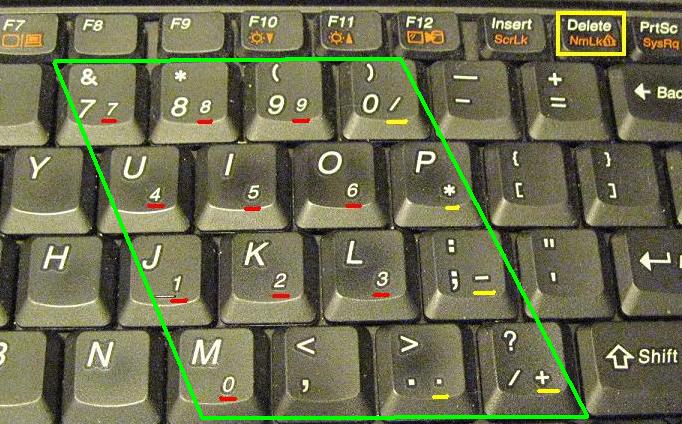
Are you using a notebook? If so then the built in Numeric keypad is accessed by holding down the fn function key or the numlock key.

How to Use the Numeric Keypad on Your Laptop - dummies

keypad.PNG

Translate
Adobe
LEGEND ,
Feb 12, 2017 Feb 12, 2017

It is Zero and you have to use the numeric keypad and not the number keys on the top of the keyboard.

Also no Plus Sign is needed and you Hold Down the Alt key while typing the numbers.

Alt 0169 = ©

Translate
Report
Community guidelines
Be kind and respectful, give credit to the original source of content, and search for duplicates before posting. Learn more
community guidelines
New Here ,
Feb 12, 2017 Feb 12, 2017

What do you mean "numeric keypad"? The only numbers on my keyboard are the ones on top.

Translate
Report
Community guidelines
Be kind and respectful, give credit to the original source of content, and search for duplicates before posting. Learn more
community guidelines
LEGEND ,
Feb 12, 2017 Feb 12, 2017

Apparently for notebooks without a numeric keypad you may be able to use other keys as the keypad, by hold the fn key if you have one. See this image to get the idea:

http://techwelkin.com/wp-content/uploads/2014/04/laptop-keyboard-numpad.jpg

Failing that, copy one of ours for now: ©

Translate
Report
Community guidelines
Be kind and respectful, give credit to the original source of content, and search for duplicates before posting. Learn more
community guidelines
LEGEND ,
Feb 12, 2017 Feb 12, 2017
LATEST

Are you using a notebook? If so then the built in Numeric keypad is accessed by holding down the fn function key or the numlock key.

How to Use the Numeric Keypad on Your Laptop - dummies

keypad.PNG

Translate
Report
Community guidelines
Be kind and respectful, give credit to the original source of content, and search for duplicates before posting. Learn more
community guidelines