Participant
March 2, 2015
Answered

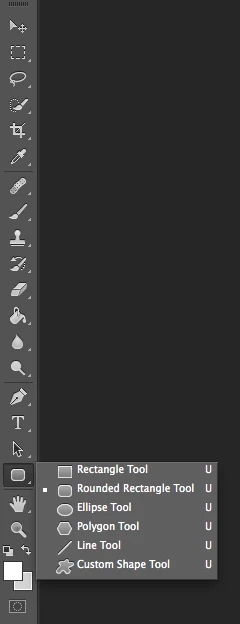
I can't find the line tool. Where is it?

  • March 2, 2015
  • 2 replies
  • 41518 views

I am new to Photoshop CS6.  I was using CS2.

I can't seem to find the line tool.  Can someone please tell me how to get the line tool?

Thanks,

Gary

This topic has been closed for replies.
Correct answer SJRiegel

2 replies

priyankas72354167
Adobe Employee
Adobe Employee
January 16, 2018

Hi

Press and hold the left button of mouse on the rectangle tool in Photoshop.

then it will give you all the options

SJRiegelCorrect answer
Legend
March 2, 2015

juresti
Known Participant
January 16, 2018

It's not there anymore

Trevor.Dennis
Community Expert
Community Expert
January 16, 2018

If you were talking about CC2017 then I'd have some thoughts for you, but with CS6, there were no issues that I can remember. If all else fails, then try resetting Preferences, but I don't think that will help quite honestly.  If you check again and it is definitely missing, then reinstall Photoshop.

Unless Homer had it