ekaterinab44124640
Participant
July 3, 2018
Question

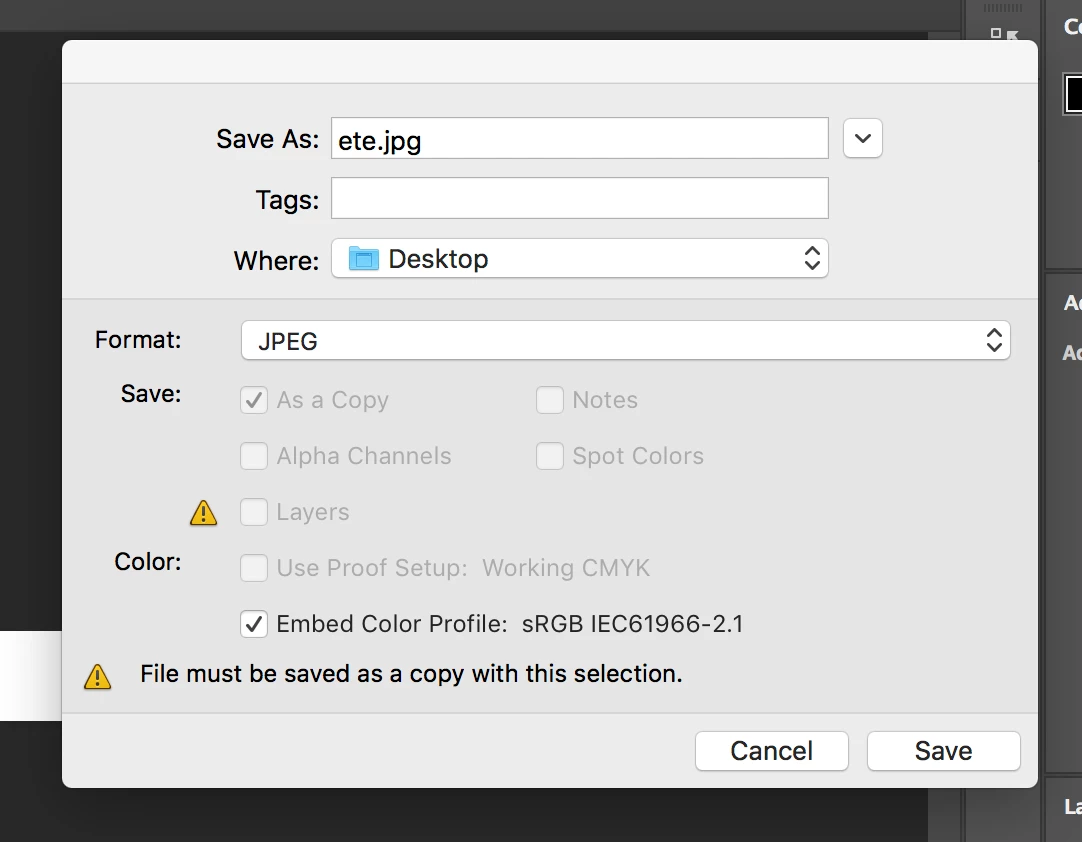
I have a problem! Error "file must be saved as a copy with this selection"!

  • July 3, 2018
  • 7 replies
  • 22522 views

I have a problem! Error "file must be saved as a copy with this selection"! Photoshop cc
    This topic has been closed for replies.

    7 replies

    Participant
    May 3, 2021

    Adobe, please address this issue. It's not a "feature". It's a bug.

    strahdt41006037
    Participant
    July 15, 2020

    me too, this problem make a very stupid way for working on updating files.
    I think some people answe this dun get your point,

    Before, if I finish a PSD and save as a JPG, ofcouse it will save as a copy because I will keep the PSD file, but the problem is, when u save a PSD for ex. abc.psd to abc.jpg once, if you make a little change then save it again, your CANNOT replace it, EVEN you click overwrite, it say "must save a copy" so even you type abc.jpg and it ask u once you say yes overwrite it, the outcome will be abc_copy.jpg...

    this very affect designer or doing html which need to update and change alot, since i need to rename it manual everytime...

    If anybody can let me know how to disable would be very helpful

    wckdtall
    Inspiring
    August 22, 2020

    I had a file I was looking into today, trying to save it as a PNG, and my workflow was flattening the file as I needed a white background and then saving out. Problem is, not even through scripting was I able to remove this final save as dialog. Known issues for JPGs not being flat, 8bit, having paths, alpha channels or hidden layers. PNGs are pretty much the same, aside from having the added requirement of being RGB. You could flatten and save in the same location through actions, but save as actions often include the path, and would have to be the same, or rerecorded every time. Can you use Export As instead since it's been created to make web graphics easier?

    Participant
    October 30, 2018

    I had the same problem when working with scanned negs, I think because it sets the embedded colour profile automatically (and you can charge it or select anything else) you need to merge the layers with your background and then it will save as a JPEG. Make sure you save the PS file before you do this in case you want to go back and edit the image again. Took me a while to figure out, I tried to go ahead with the error once and PS got stuck saving on 0% and wouldn't let me close anything. Hope this helps

    michaelb72906282
    Participant
    December 19, 2018

    What if i want to save in PNG without background? Is it possible?

    Community Expert
    July 3, 2018

    if you want to save without merging the layers,  save it as a TIF,  it won't force you to save as a copy that way

    ekaterinab44124640
    Participant
    July 3, 2018

    If so, then the image quality is worse! What to do? Why was not it before?

    JohanElzenga
    Community Expert
    Community Expert
    July 3, 2018

    It's a warning, not an error. You are trying to save a layered file as jpeg. Because the jpeg protocol does not support layers, that would destroy the layers ('flatten' the file). For that reason Adobe protects you against mistakes by making this saved file a copy, and keeping the layered original in memory so you can save that too.

    -- Johan W. Elzenga
    Known Participant
    February 13, 2023

    I shoot in RAW, make a few simple edits, like exposure, shadows, saturation, and then want to "save as" a jpeg.  It used to remember that I wanted to save as a jpeg, and the .jpeg extension would already be there.  Now it defaults to .psd, requiring me to click the drop-down menu and select .jpeg, getting that same warning sign about saving as a copy.  It has created more work.  Nothing on the photo needs to be flattened - the edits I make for the jpeg are permanent. 

    It should be fixed, because it has made my workflow slower.  This is what Photoshop does - they make some things better and more efficient, and then make other things more time-consuming to use.  

    Known Participant
    February 13, 2023

    I figured it out I think.  It does this when you are in 16-bit mode.  I opened a RAW file, went to top left...  Photoshop / Preferences / Camera Raw / Workflow, and then changed to "Depth: 8 bits / channel."  Good enough quality and now I don't have to keep selecting jpeg through menus everytime I save a file.


    Derek Cross
    Community Expert
    Community Expert
    July 3, 2018

    This is not an error, it's normal behaviour when saving a PSD file as a JPG, PNG or GIF
