
mciac
Participant
December 16, 2015
Answered

I updated Photoshop CC and now my alternate marquee tools and lasso tools are missing

  • December 16, 2015
  • 2 replies
  • 15415 views

Is anyone else having this problem? And in the mean time, does anyone know if there is a key command to make a rectangular marquee into an elliptical one? I updated my Photoshop CC yesterday and now I can't access the "hidden" marquee and lasso options in the tool panel. There are no little triangles in the bottom right corner of those tools. The other tools are fine.
This topic has been closed for replies.
Correct answer sarsaxen

HI Mciac,

You can easily switch between the Rectangular and Elliptical Marquee Tools from your keyboard, although exactly how you do it will depend on how you have things set up in Photoshop's Preferences. Every tool in the Tools panel can be accessed by pressing a certain letter on your keyboard. Both the Rectangular and Elliptical Marquee Tools can be selected by pressing the letter M, and to switch between them, you either press M again by itself or you'll need to press Shift+M. Again, this depends on how you have it set up in the Preferences.


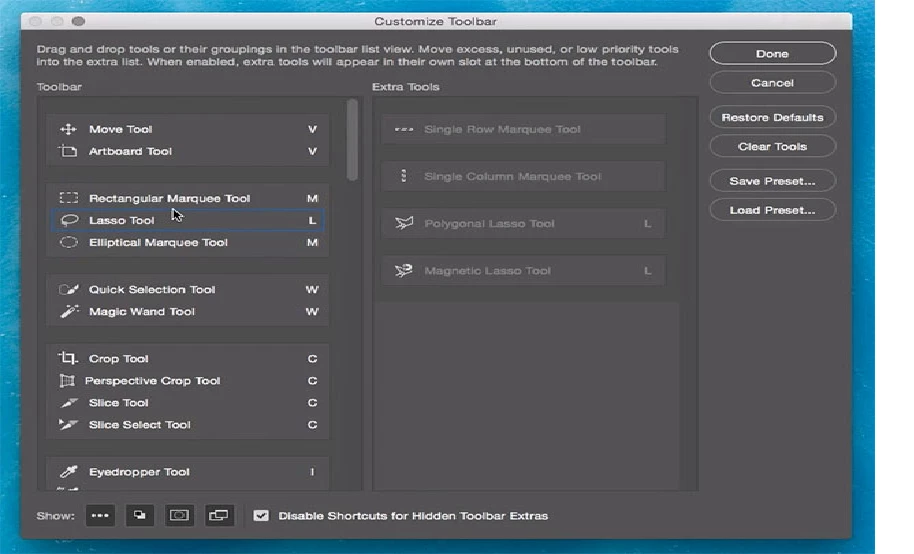
In new Photoshop CC 2015 we have an option to customize toolbar according to your needs.

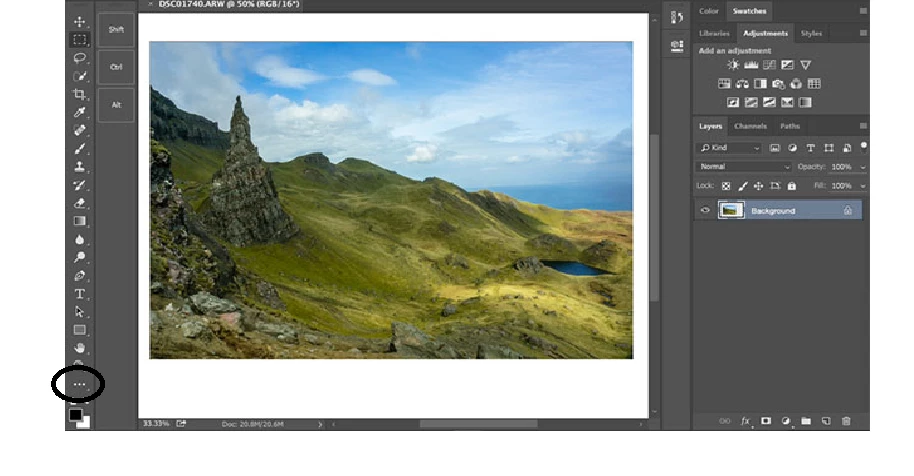
If you have some tools missing, then simply click on the "Three dots " present at the bottom of the tool bar panel and customize the tools afterwards.


Please let us know if it helps.

Regards

Sarika

2 replies

Participant
March 8, 2019

I don't use the alternate marquee tools very often but this really threw me when I tried to find it earlier today. I'm in the same boat as the others here--it's MUCH harder to find in the big list of items than where it was and there was no reason to change it.

Adobe, PLEASE move it back as well as the other tools you "helpfully" dumped.

sarsaxen
sarsaxenCorrect answer
Participating Frequently
December 16, 2015

HI Mciac,

You can easily switch between the Rectangular and Elliptical Marquee Tools from your keyboard, although exactly how you do it will depend on how you have things set up in Photoshop's Preferences. Every tool in the Tools panel can be accessed by pressing a certain letter on your keyboard. Both the Rectangular and Elliptical Marquee Tools can be selected by pressing the letter M, and to switch between them, you either press M again by itself or you'll need to press Shift+M. Again, this depends on how you have it set up in the Preferences.


In new Photoshop CC 2015 we have an option to customize toolbar according to your needs.

If you have some tools missing, then simply click on the "Three dots " present at the bottom of the tool bar panel and customize the tools afterwards.


Please let us know if it helps.

Regards

Sarika

mciac
mciacAuthor
Participant
December 16, 2015

Hi Sarika,

Thanks for both of those pieces of information. They are both a big help.

Much appreciated!

mciac

sarsaxen
Participating Frequently
December 16, 2015

You are welcome.

Glad to help

Have a happy Holidays .