/t5/photoshop-ecosystem-discussions/i-want-to-create-an-empty-box/m-p/2806713#M13143Jun 23, 2010
Jun 23, 2010
Copy link to clipboard
Copied
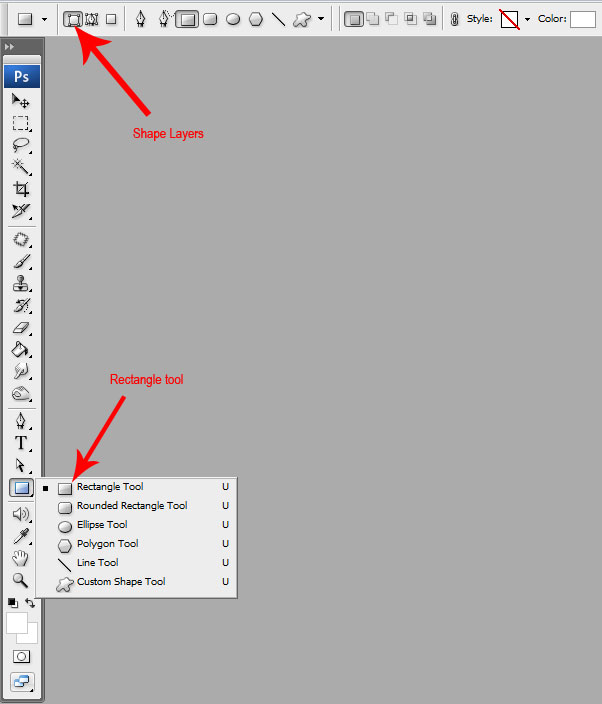
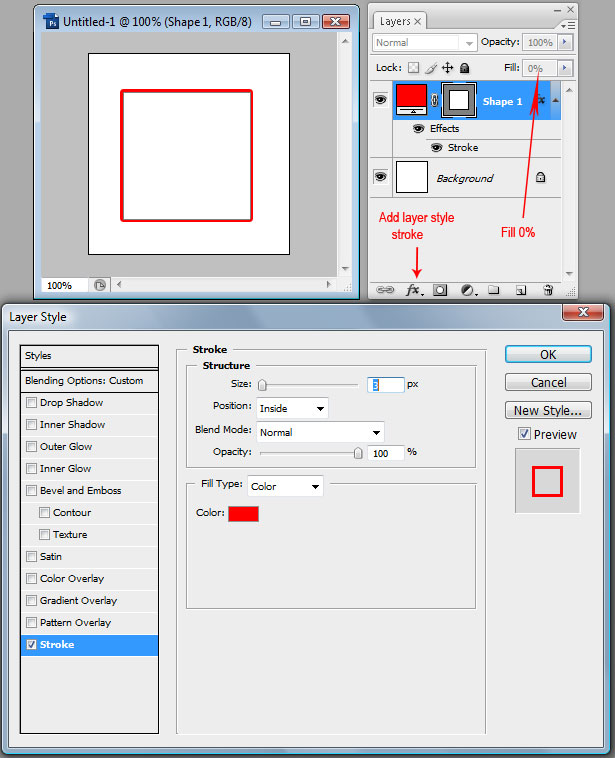
I like creating the rectangle, giving it a Stroke and then setting the layer fill to 0%. As a note, you have to put the stroke to the inside so that the corners are limited to the dimensions of the rectangle and the corner points stay sharp.
/t5/photoshop-ecosystem-discussions/i-want-to-create-an-empty-box/m-p/2806714#M13144Jun 23, 2010
Jun 23, 2010
Copy link to clipboard
Copied
Here's what happens I create a new page. The background of the new page is locked. If I create a layer then add the rectangle > Edit the Stroke then what? If I make a change nothing changes the rectangle is still solid.







 5
Replies
5
Replies






 AdChoices