
Known Participant
February 6, 2020
Answered

Image Processor -- Random Alerts of Access Right Issue when running actions & resizing photos

  • February 6, 2020
  • 5 replies
  • 1611 views

I have installed Photoshop Version: 21.0.3 on Windows 10 64 bit (10.0.18362.329) / 16G RAM and external harddisks connected via USB 3.0.  All harddisks are fully accessible by me with admin rights.


I have my mouse connected via bluetooth (Logi MX Anywhere 2S).  After updating to the latest version of PS 21.0.3, I found that the mouse has become unstable to select objects, no matter doing quick selection or patch tool.  While I am pressing still the left button to define an object, it released all a sudden to define an area before I released the button.  I dd not have the same observations before updating to 21.0.3.


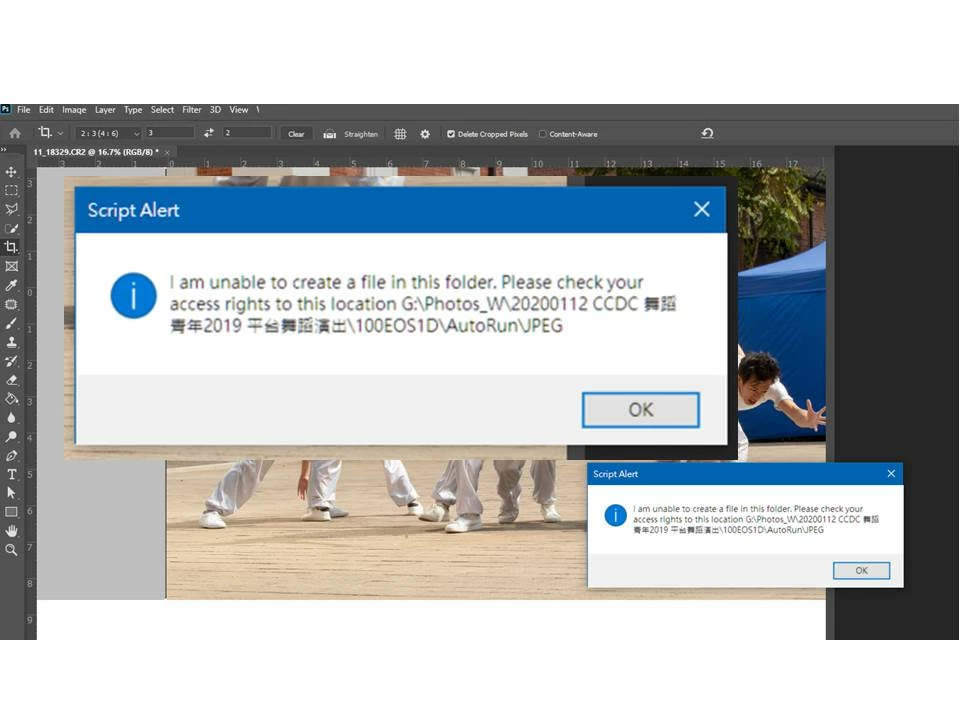
Further, I run Scripts > Image Processor to do saved actions of camera raw filter, changing of layer property, and resize of raw photos (from Canon CR2 (1DXM2), CR3 (EOS R) and Sony ARW (A9)) to PSD and JPG formats.  The Image Processor occassionally stopped at random files and generated Alert that PS could not create a file in the target folder.  However, I have full access of the harddisk!  When I clicked OK and the script could be resumed to the next file(s) and stopped again at some other file(s).


I attempted to run the same set of raw photos again, and found that such alerts would be generated at different files.  I could not isolate and find out what created the issue.

Is there any way to work around it? 


This topic has been closed for replies.
Correct answer r-bin
Change the IsFolderWritable function in the script so that it always returns "true", which each time tries to create the file "deleteme.txt" before saving and then immediately delete it.
If you have an antivirus installed, it’s not always possible to perform such actions instantly, and an alleged error comes out.
 

5 replies

r-binCorrect answer
Legend
February 8, 2020
Change the IsFolderWritable function in the script so that it always returns "true", which each time tries to create the file "deleteme.txt" before saving and then immediately delete it.
If you have an antivirus installed, it’s not always possible to perform such actions instantly, and an alleged error comes out.
 
martin.1Author
Known Participant
February 9, 2020

I edited with admin rights, the file 

C:\Program Files\Adobe\Adobe Photoshop 2020\Presets\Scripts\Image Processor.jsx

following your hint.


I finished the next batch with over 100 files without seeing the error alert.  Think it is the right solution.  Thanks

Legend
February 9, 2020
This is possible if there is an antivirus enabled, or if the folder is open in Explorer in the mode of thumbnails, or if the folder is open in a viewer such as XnView or the like.
It is not always possible to delete or rename a file immediately after creation in such a folder with a script, because the file is occupied by another process.
Eliminate all of these reasons, including antivirus. If you find the mode (and reason) in which the original script works without errors, report the problem to the feedback site of Adobe. Let them fix the script.
 
PECourtejoie
Community Expert
Community Expert
February 7, 2020

Hello, do you have problems with non-english characters folders only, did you try on a folder with only latin characters?

martin.1Author
Known Participant
February 8, 2020

I have renamed the related folders and retried without success.  It does not seem to be cause of the issue.

Just Shoot Me
Legend
February 6, 2020

Does that external still have the G:\ drive letter. Windows will auto assign drive letters to USB external devices depending on which/what drive was connected first. So if you had at one time disconnected that drive, connected some other device and then plugged back in that external it could of gotten a different drive letter.


It is best to Assign a drive letter to all externals that something else, a program, a function, is set to accesss it AT that specific drive letter.


martin.1Author
Known Participant
February 6, 2020

Sure, the drive letter was assigned, and as I clicked Ok, the scripts could be resumed. I could not confirm whether PS expected a shorter response time when delivering/pushing data to the external hard disk, then it "time out" the job.

martin.1Author
Known Participant
February 6, 2020

It is external hard disk via USB 3.0

Legend
February 6, 2020

You may have two different issues. Can you plug in a generic USB mouse to test the mouse function? Logitech is notorious for buggy drivers.


As for the access issue, is your G drive a network drive? Or local?