Copy link to clipboard
Copied
So I recently wrote a simple script to output an image at a bunch of different resolutions. However, I am running into an image quality issue that I don't run into when I do the same thing manually.
Here is an example image showcasing the image: http://terminalvelocity.ca/temp/notworking.jpg
As you can see along the top of the model's forhead there is destinct color fragmentation. Which seems very strange.
Here is the script, it is pretty simple, it asks for a few simple config options. (the above image was created using default settings). It then figures out the correct ratios and loops through doing each resize, saving the image, then reverting the history so each iteration uses the original image data and not the resized version:
doc = app.activeDocument;
openFilePath = Folder.selectDialog ("Where do you want the images to be saved?");
maxSize = Number(prompt("What would you like to be the maximum length of the long edge? (Image is never upsized) (pixels)", 2800));
minSize = Number(prompt("What would you like to be the minimum length of the long edge? (pixels)", 100));
gap = Number(prompt("How much smaller should each image be? (pixels)", 100));
quality = Number(prompt("What quality would you like the JPG exported as (0-12)", 10));
var size;
var primary;
var secondary;
if(doc.width > doc.height){
primary = doc.width;
secondary = doc.height;
}else{
primary = doc.height;
secondary = doc.width;
};
var ratio = secondary/primary;
var size = [];
for(var i = maxSize;i>minSize;i-=gap){
var p = i
var s = i * ratio;
size.push([p,s]);
};
var w;
var h;
var n;
for(var i in size){
if(doc.width > doc.height){
w = n = size[0];
h = size[1];
}else{
w = size[1];
n= h = size[0];
};
if(doc.width >= w && doc.height >= h){
doc.resizeImage(w,h,null,ResampleMethod.BICUBICSHARPER);
jpgFile = new File(openFilePath+"/"+n+".jpeg" )
jpgSaveOptions = new JPEGSaveOptions()
jpgSaveOptions.embedColorProfile = false
jpgSaveOptions.formatOptions =
FormatOptions.STANDARDBASELINE
jpgSaveOptions.matte = MatteType.NONE
jpgSaveOptions.quality = quality
app.activeDocument.saveAs(jpgFile, jpgSaveOptions, true,Extension.LOWERCASE);
doc.activeHistoryState = doc.historyStates[doc.historyStates.length-2];
};
};
In comparison, here is an example of an image of the exact same resolution that does not exhibit this issue at all:
The steps taken to save this image were as follows: http://photography.terminalvelocity.ca/content/images/2012/avery_konrad_6/horizontal/1500.jpg
Image > Resize > Bicubic Sharper (1500px);
Save For Web
Jpeg
Quality 75
Optimzed: true
Progressive: false
Blur: 0
Convert to sRGB: true
Anyway, as you can see, The manually exported image does not have any of the quality issues that are present within the scripted image. I am pretty new to photoshop scriping so am assuming it has something to do with me missing some sort of option in the save settings. Any help would be swell.
Also note, this doesn't occur on all images, I usually don't see an issue when using the script, however, something about the tones of this particular photo make it really obvious.
I am using the latest version of Photoshop CS6 (creative cloud) on Max OSX
thanks so much!

Copy link to clipboard
Copied
Should
jpgSaveOptions.quality = …
not be a number?
Sorry, hadn’t read the post thoroughly enough.
Copy link to clipboard
Copied
c.pfaffenbichler wrote:
Should jpgSaveOptions.quality not be a number?
For others reading this thead here it was answered at PS-Scripts and c.pfaffenbichler was on the right track. The quality was being set from the input of a dialog edittext. Explicity converting that String to Number seems to have fixed this issue.
sfwOptions.quality = Number(quality);
Copy link to clipboard
Copied
Have you tried if embedding the profile makes a difference?
I can’t seem to get a result similarly bad to the one you posted.
Copy link to clipboard
Copied
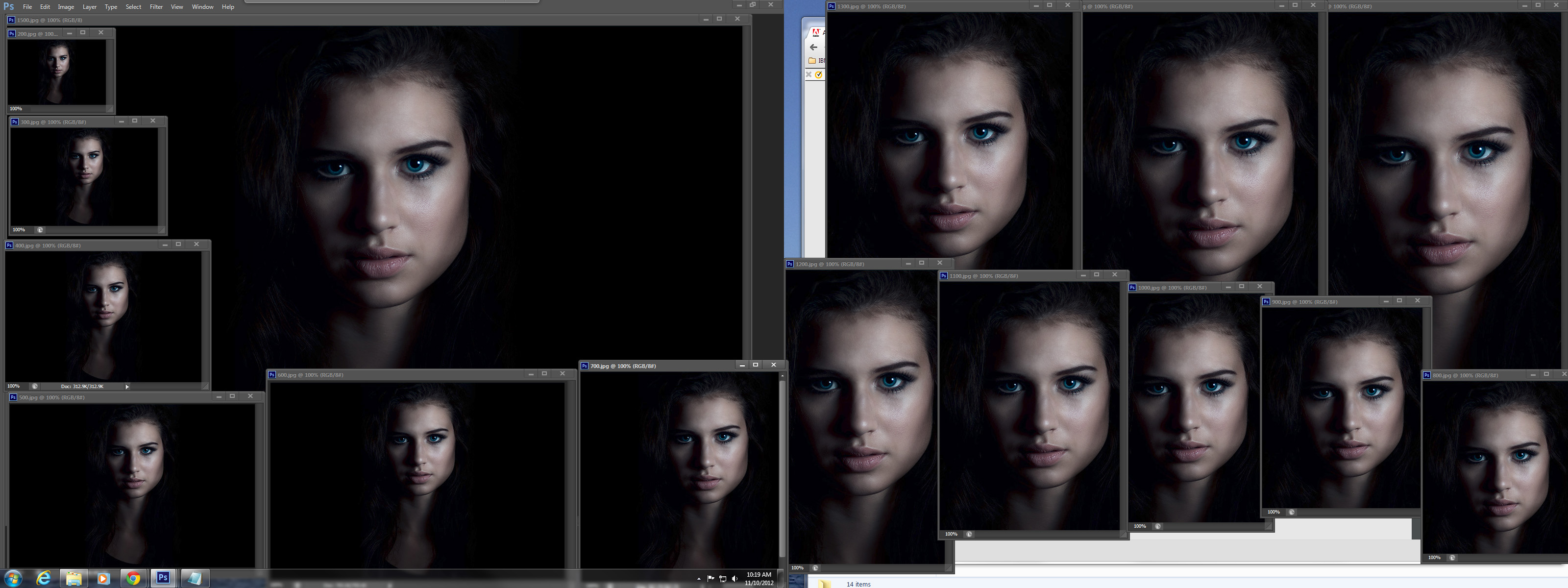
I'm on windows find the bicubicsharper does not work well it the image being resized has been highly sharpened all ready. Because of my Photoshop preferences I had to make minor modification to your script. I'm also a bit colorblind so i don't see many color issues so I include a screen capture if what windows does with your image and script.
var orig_ruler_units = app.preferences.rulerUnits;
app.preferences.rulerUnits = Units.PIXELS; // Set the ruler units to PIXELS
doc = app.activeDocument;
openFilePath = Folder.selectDialog ("Where do you want the images to be saved?");
maxSize = Number(prompt("What would you like to be the maximum length of the long edge? (Image is never upsized) (pixels)", 2800));
minSize = Number(prompt("What would you like to be the minimum length of the long edge? (pixels)", 100));
gap = Number(prompt("How much smaller should each image be? (pixels)", 100));
quality = Number(prompt("What quality would you like the JPG exported as (0-12)", 10));
var size;
var primary;
var secondary;
if(doc.width > doc.height){
primary = doc.width;
secondary = doc.height;
}else{
primary = doc.height;
secondary = doc.width;
};
var ratio = secondary/primary;
var size = [];
for(var i = maxSize;i>minSize;i-=gap){
var p = i
var s = i * ratio;
size.push([p,s]);
};
var w;
var h;
var n;
for(var i in size){
if(doc.width > doc.height){
w = n = size[0];
h = size[1];
}else{
w = size[1];
n= h = size[0];
};
if(doc.width.value >= w && doc.height.value >= h){
doc.resizeImage(w,h,null,ResampleMethod.BICUBICSHARPER);
jpgFile = new File(openFilePath+"/"+n+".jpeg" )
jpgSaveOptions = new JPEGSaveOptions()
jpgSaveOptions.embedColorProfile = false
jpgSaveOptions.formatOptions =
FormatOptions.STANDARDBASELINE
jpgSaveOptions.matte = MatteType.NONE
jpgSaveOptions.quality = quality
app.activeDocument.saveAs(jpgFile, jpgSaveOptions, true,Extension.LOWERCASE);
doc.activeHistoryState = doc.historyStates[doc.historyStates.length-2];
};
};
app.preferences.rulerUnits = orig_ruler_units; // Reset units to original settings

Copy link to clipboard
Copied
hmm, thanks for the thoughts.
I did some testing with different resize methods noticing no change, but then decided to try a different format (PNG) and the problem completely went away. Of course the PNGs are far too large to use but it at least tells me the problem is how I am saving, and not resizing.
I tried including a color profile and not with no change.
I also changed to using the ExportOptionsSaveForWeb() object rather than saveAs but noticed no noticable difference.
From what I can see from your screenshot it looks like the problem isn't occuring for you. I wonder if it is sepecific to the Mac version of Photoshop are you n CS6?
I am going to keep tweaking and trying to figure it because if I let the script do the resize then manually run save for web myself there is no issue so it has to be something. ![]()
Copy link to clipboard
Copied
You can open the screen capture in a new tab or window and zoom to see actual pixels I saw no problem either,
Get ready! An upgraded Adobe Community experience is coming in January.
Learn more