

Answered
Import > WIA > Scan Default File Location - Can I Change It?
Having a problem with all my scans filling up the C:\documents\username folder instead of just scanning them into RAM and appearing in Photoshop.
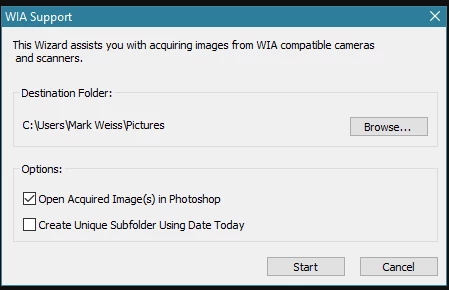
Even if I change the destination folder, it always reverts back to above. And there is no option NOT to save the file before I've done anything with it, too.
I'm used to TWAIN scanning where it scans to Photoshop and then I have the option where to save it. It doesn't secretly save it in my C: drive.
But since I got the Brother MFC-6490CW, it uses WIA driver and gives me this problem.
BTW, this is on Photoshop CS6.
How can I change this default to my regular scan folder, F:\scans ?
 AdChoices