Inspiring
December 1, 2017
Answered

Interface font is too big cc 2018

  • December 1, 2017
  • 2 replies
  • 3202 views

Hello

When I installed Photoshop cc 2018 , found that font and menus is very big

I pressed ctrl + K

preferences 

interface

UI font size : meduim

Ui scaling : 100 % - Auto

restart photoshop

ater restart the font became too small

What can I do else please ?

Thanks
    This topic has been closed for replies.
    Correct answer romeozzzzzzz

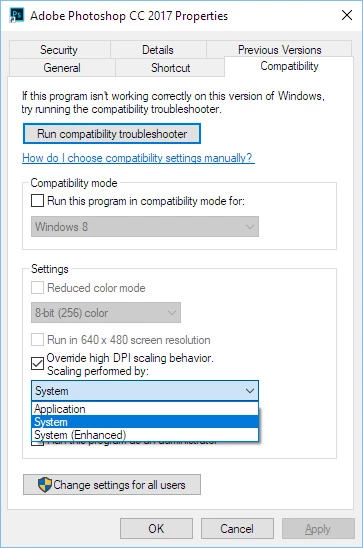
    Problem solved by this steps

    2 replies

    romeozzzzzzzAuthorCorrect answer
    Inspiring
    December 1, 2017

    Problem solved by this steps

    floramc
    Community Expert
    Community Expert
    December 3, 2017

    well done and thanks for sharing!

    floramc
    Community Expert
    Community Expert
    December 1, 2017

    Hi!

    I have my UI font size to small and scale to AUTO, this is how big they look on my 21 inches screen

    Try to check if there is anything to do with the preferences on your computer rather than in PS. What are you using?

    Inspiring
    December 1, 2017

    I aslo have 23 inch screen , i made the size of text and apps to 150 %

    What can i do else ?

    Thanks

    ً