April 13, 2019
Answered

Is the LAB mode suitable for every photo?

  • April 13, 2019
  • 6 replies
  • 3961 views

Hi folks,

I was wondering if every image can be edited in LAB mode? Or are there situations, where the "good old" RGB mode is more appropriate?

This topic has been closed for replies.
Correct answer Norman Sanders

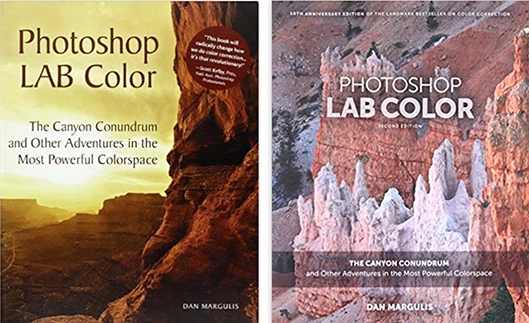
The question you asked deserves a complete answer, one that describes the advantages, limitations and myths regarding this unique color mode. The books by Dan Margulis that are devoted to the subject run about 400 pages. It is not light reading but very rewarding. I recommend that you start with the first edition of "Photoshop LAB Color". It is the one with the cover shown on the left. You will learn when Lab is the most appropriate mode for achieving a desired result and when it offers little benefit. I can promise you an education in Curves, and awareness of Lab's valuable source for the basis of masks that can then be applied in Lab, RGB or CMYK.

On a personal note, some years ago I invited Dan to present a lecture to my college students in NewYork It was unforgettable. I can't recall any other time when, at the conclusion of a guest lecturer's presentation, the students gave a resounding standing ovation.  In my opinion, these two editions (I use both) and  Dan's "Professional Photoshop" provide an indispensable education, especially if you intend to prepare your work for print.    

6 replies

c.pfaffenbichler
Community Expert
Community Expert
April 15, 2019

I would like to point out that the original poster has so far not chimed in again – but an interesting thread nonetheless.

rayek.elfin
Legend
April 14, 2019

But then, if we are talking about data integrity, for certain tasks we ought to be careful when using Photoshop's 16bit mode, which can handle 0-32,768 values, and not the full 0-65,535 16bit range of data for images that make use of the full range of 16bit (stellar photography, HDR, medical imagery, 3d depth data, 3d dynamic range rendering and digital painting, etc.). Those data ranges will be reduced to 32,768 values when opened in Photoshop's 16bpc mode, losing half the data.

Anyway, for the bulk of photography work it doesn't matter, since most photos are at most 12bpc, if I remember correctly. Still, it might have negative consequences if not kept in the back of one's mind for certain jobs, including HDR photo stacking.

My question would be: since the point was made in this discussion that LAB works best with higher dynamic ranges, how does the 0-32,768 range in Photoshop affect working in LAB mode? Does it matter? Would a full 16bpc mode with a 0-65,535 value range yield potentially better results? Or is the point moot, because only in edge cases would it have a noticeable effect, if at all?

How much more effective or controllable are LAB moves in a full 16bpc range?

I am genuinely curious.

D Fosse
Community Expert
Community Expert
April 15, 2019

Who said there were any problems in Lab 16 bits, Rayek? Read again. We said there were problems in Lab 8 bits. Nobody said there were problems in Lab 16 bits, or 15+1.

This time I want you to show us how and why Photoshop's 0-32768 range destroys data, in a way that could be prevented with a 0-65535 range. I want to see actual examples from the real world.

Show, don't tell.

rayek.elfin
Legend
April 15, 2019

Here you go.

Here is the original 16bit full range 0-65535 HDR image. The centre of the sun is around 63455, and the darkest shadow around 50.

To test if Photoshop destroys data, I adjusted the gamma of the image in PhotoLine.

I then flattened this image and saved it as a new full range 16bit PNG file.

In PhotoLine I reversed the gamma again:

In Photoshop I opened the same image, and reversed the gamma once more:

Result: in PhotoLine the sun's data remains unchanged. In Photoshop it blows out. The highest value possible is 32678, and indeed the center of the sun is exactly that value. But it also lost details, and the halo is gone. Photoshop's conversion to 0-32768 from a higher range of 0-65335 values seems to ignore the higher dynamic range values and maps the colour range in such a way that the higher range is capped.

Which means Photoshop destroyed the high-range values, and the result is very visible.

Is that enough proof for you?

Now, back to my original question: how does this affect LAB moves? I am just genuinely curious if someone knows, because I have no idea myself.  I am not trying to diss Photoshop here. Photoshop's 16bit mode is what it is. If LAB works best with high colour ranges, is it theoretically possible that LAB moves would be affected by this, compared to an application that does work with the full 16 bit range? Similar to the 8bit versus 16bit?

Norman Sanders
Norman SandersCorrect answer
Legend
April 13, 2019

The question you asked deserves a complete answer, one that describes the advantages, limitations and myths regarding this unique color mode. The books by Dan Margulis that are devoted to the subject run about 400 pages. It is not light reading but very rewarding. I recommend that you start with the first edition of "Photoshop LAB Color". It is the one with the cover shown on the left. You will learn when Lab is the most appropriate mode for achieving a desired result and when it offers little benefit. I can promise you an education in Curves, and awareness of Lab's valuable source for the basis of masks that can then be applied in Lab, RGB or CMYK.

On a personal note, some years ago I invited Dan to present a lecture to my college students in NewYork It was unforgettable. I can't recall any other time when, at the conclusion of a guest lecturer's presentation, the students gave a resounding standing ovation.  In my opinion, these two editions (I use both) and  Dan's "Professional Photoshop" provide an indispensable education, especially if you intend to prepare your work for print.    

April 19, 2019

Hi Norman,

great answer. Thank you for your help.

D Fosse
Community Expert
Community Expert
April 13, 2019

You'll discover that each has its own, distinctive advantages and disadvantages.

The main difference is that in Lab, the color component is totally divorced and independent from the luminance component. This is sometimes a good thing, sometimes just complicating everything.

There are some operations where I always convert to Lab, such as desaturating, because it maintains the inherent lightness of, say, a bright yellow. For other things like correcting color casts Lab is unpredictable and clumsy. 

Because Lab is such a huge color space, like ProPhoto, you absolutely need to be in 16 bit depth.

c.pfaffenbichler
Community Expert
Community Expert
April 13, 2019
Because Lab is such a huge color space, like ProPhoto, you absolutely need to be in 16 bit depth.

Indeed.

Pretty much any relevant RGB Space is considerably smaller and converting an Lab-image into it would therefore mean that a lot of information could get wasted.

Eugenio.NYC
Participating Frequently
April 13, 2019

Check the Dan Margulis book, a good reference about LAB in my opinion

c.pfaffenbichler
Community Expert
Community Expert
April 13, 2019
I was wondering if every image can be edited in LAB mode?

Why would you want to do that?

Anyway, working in Lab in 8bit would not be a good idea.

Or are there situations, where the "good old" RGB mode is more appropriate?
Working in RGB Is a perfectly valid option for editing photographic images.

Inspiring
April 14, 2019

c.pfaffenbichler  schrieb

Anyway, working in Lab in 8bit would not be a good idea.

Dear Christian, dear Dag,

practically working in Lab in 8bit (Lab-8) seems to be not so bad:

The first edition of Dan Margulis book "Photoshop LAB Color" is entirely based

on PSD Lab-8 data, at least this is my impression after checking some examples

on the CD.    

My test:

The first image IM1 is an sRGB image of a PDF page (a rather complex printer test

page) with 288ppi, then downsampled for 72ppi, then saved as JPEG (Q=9).

The second image Im2 is an sRGB image of the same PDF page with 288ppi,

then converted to Lab and saved, then reloaded, converted to sRGB, then

downsampled for 72 ppi, then saved as JPEG (Q=9).

The third image, if shown (it is in background), is the result of the calculation for

Im3 = 127 + 2*(Im1-Im2) for the gray channel (numbers 0..255), actually a uniform

area, but the histogram has a small peak with standard deviation 0.33.

Perhaps is my test too weak or even wrong? Then we have still Dan Margulis' book...

These arguments are in my opinion saying, that it is not generally wrong to work

in Lab-8.

Best regards --Gernot Hoffmann

Norman Sanders
Legend
April 14, 2019

G.Hoffmann​​. In strong support of your conclusion I direct you to pages listed in the index under "Bit Depth" in the First Edition of "Photoshop Lab Color."

Those who follow Dan's writings are aware that, before making a pronouncement, he does extensive testing and also asks his readers to submit work to prove or disprove his conclusions.

To quote from the book:

"In the past three years, about a dozen people. including me, have made serious efforts to find anything to support the proposition that 16-bit might be better under any circumstances. By that, I mean any unretouched color photograph that might possibly be used in the real world and any sequence of attempts to improve the image, however farfetched, where editing in 16-bit creates a better result than 8-bit images. Images have been tortured beyond belief. Nobody has found any quality gain at all."

As he reminds us elsewhere in the book:
"16 bits per channel, which gives us a theoretical possibility of of 65,536 levels of gray, (are) still reported to us on the same 0-255 scale."

More support for his conclusions also appeared at his Yahoo "Photoshop Color Theory Newsgroup" column in 2004. It is too long to include here, but it is available from me on request.

Finally, for those who want to string me up for what you feel is heresy, remember that I am only the messenger. Take It up with Dan.

Mylenium
Legend
April 13, 2019

Not sure what you mean. It all depends on the specific operations. There is no general "A is better than B" here. you need to be a lot more specific about what you are actually doing and why you think the Lab mode would be superior or preferable to RGB or whatever.

Mylenium