
Participant
August 7, 2017
Question

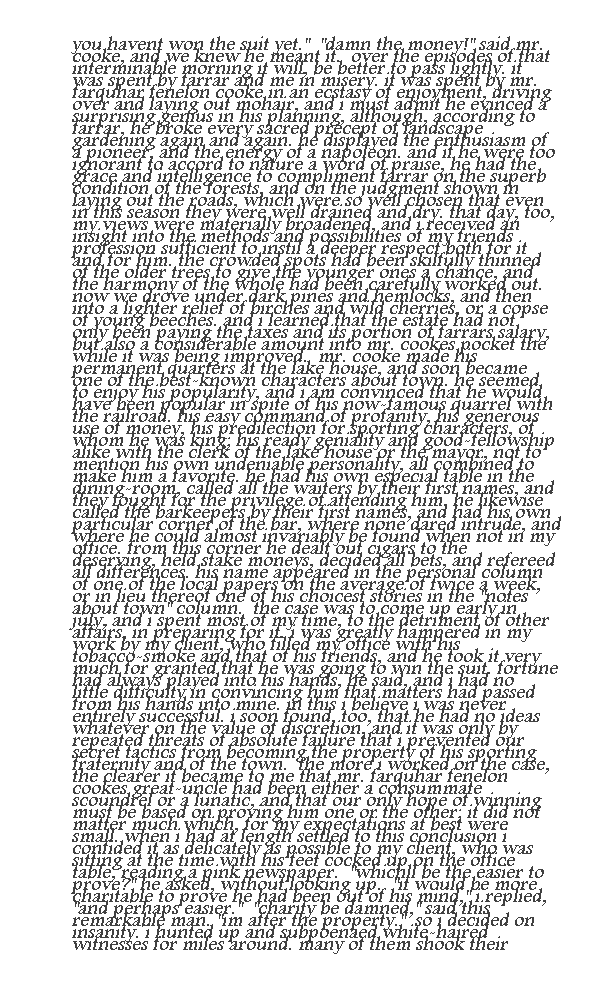
Issue improving the file of GIF type

  • August 7, 2017
  • 1 reply
  • 266 views

Hello Team,

I would really appreciate a help with a file and files of this type.

1. how can I copy text inside this file and paste it on notepad as text format

2. how can I improve the quality of white space between lines

3. how can I improve image size

I have tried however, I am unable to sort the things out if the team will help me with the answers I'll be more than happy

Thanks.
    This topic has been closed for replies.

    1 reply

    Michael J. Hoffman
    Community Expert
    Community Expert
    August 7, 2017

    This post was made in a Photoshop forum, which may not be the best place, depending on what tools you have available and how you approach the solution. In my opinion, you'll most likely not be able to use any kind of optical character recognition (OCR), such as what is available with Acrobat, to read this due to poor quality. You may need to type it over yourself.

    You could always try, though - do you have the full Creative Cloud subscription with access to Acrobat DC? If so, try converting to PDF and running OCR within Acrobat. Once you do, you could copy the text to the clipboard - but be on the lookout for errors in recognition.

    Mike

    Legend
    August 7, 2017

    I agree, the chances of any automatic solution is very small. The task here will be to retype this. Or just buy a copy of this 1895 bestseller for a few dollars. It's unusual to find a novel reset in this compact way.

    Legend
    August 7, 2017

    (Unless it's a galley proof, but I'd expect that to be divided into the original paragraphs still).