


- Home
- Photoshop ecosystem
- Discussions
- Issues with Javascript on Mac but not PC
- Issues with Javascript on Mac but not PC

Copy link to clipboard
Copied
I'm running into some strange issues with some script in which another user's Mac will halt on a line that does nothing more than store a history state to the variable "actHist" while PCs run the entire script fine. We'll be testing the script an another Mac later today, but I was wondering if there are known issues with running Java based scripts on Macs vs PCs? Below is a screenshot of the problem:
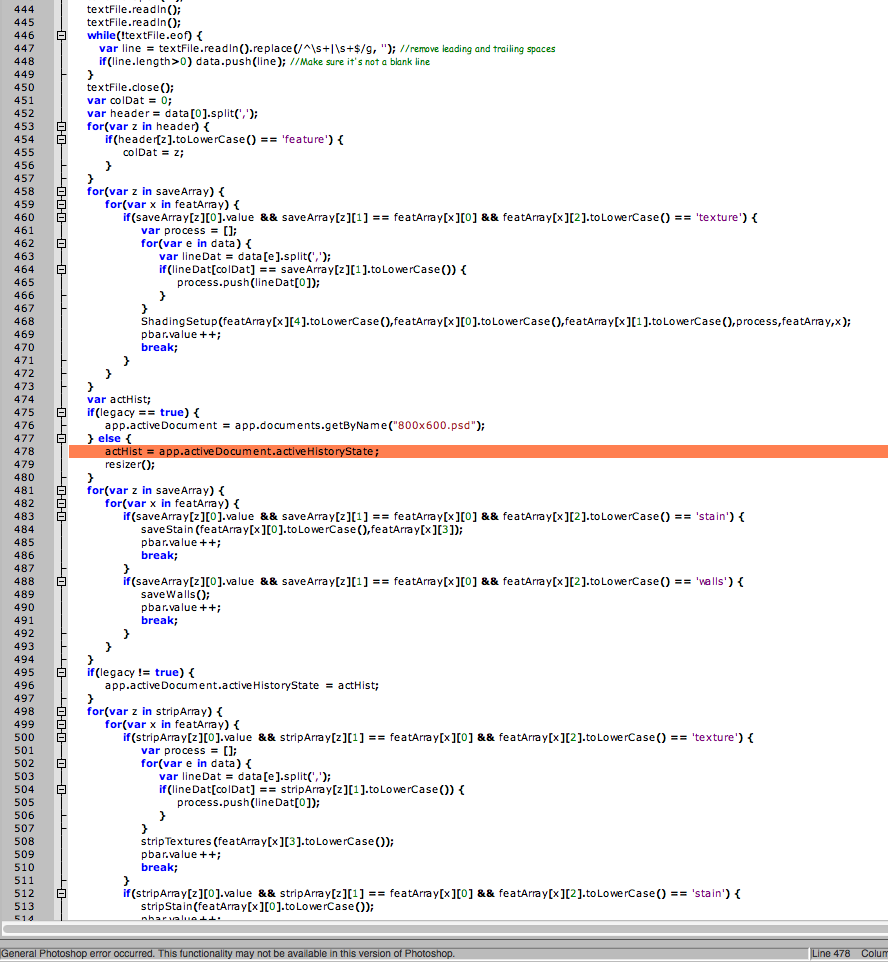
I can't figure out WHY it stops on that area. I tried asigning the variable outside the else statement cause I was out of ideas, but it does the same thing regardless where I declare it. The odd part is, that same line is used elsewhere in the script without issues, it just does not seem to work in this one spot on a Mac (PC has no issues with it). Any idea why this is only a problem for the Mac and not any PCs?


 1 Correct answer

Tom is right. This is a known problem and Adobe has been alerted about it. This error can also occur when trying to access a document's activeLayer.
I've used this code for troublesome lines like this and it has worked for me:
try {
doc = app.activeDocument;
} catch (e) {
$.sleep(500);
var desc = new ActionDescriptor();
desc.putEnumerated(cTID("Stte"), cTID("Stte"), cTID("RdCm"));
executeAction(cTID("Wait"), desc, DialogModes.NO);
doc = app.activeDocument;
}
This has not worked for other
...

Explore related tutorials & articles
 13
Replies
13
13
Replies
13


Copy link to clipboard
Copied
Are your documents in tabbed mode? Preferences->Interface->Open Documents as Tabs on vs off. I think we have issues with scripting when *not* in tabbed mode.
Copy link to clipboard
Copied
Tom is right. This is a known problem and Adobe has been alerted about it. This error can also occur when trying to access a document's activeLayer.
I've used this code for troublesome lines like this and it has worked for me:
try {
doc = app.activeDocument;
} catch (e) {
$.sleep(500);
var desc = new ActionDescriptor();
desc.putEnumerated(cTID("Stte"), cTID("Stte"), cTID("RdCm"));
executeAction(cTID("Wait"), desc, DialogModes.NO);
doc = app.activeDocument;
}
This has not worked for others. Someone has suggested using:
try {
doc = app.activeDocument;
} catch (e) {
app.refresh();
doc = app.activeDocument;
}
I haven't tried this because I don't have a reproducible test case.

Copy link to clipboard
Copied
The above workarounds don't work for me on Windows, the only thing that has worked for me is to set the prefs to tabbed whilst the script is running.
function tabInterface(onOff) {
if(onOff == undefined) onOff=true;
var desc19 = new ActionDescriptor();
var ref8 = new ActionReference();
ref8.putProperty( charIDToTypeID('Prpr'), stringIDToTypeID('interfacePrefs') );
ref8.putEnumerated( charIDToTypeID('capp'), charIDToTypeID('Ordn'), charIDToTypeID('Trgt') );
desc19.putReference( charIDToTypeID('null'), ref8 );
var desc20 = new ActionDescriptor();
desc20.putBoolean( charIDToTypeID('EGst'), true );
desc20.putBoolean( stringIDToTypeID('openNewDocsAsTabs'), onOff );
desc19.putObject( charIDToTypeID('T '), stringIDToTypeID('interfacePrefs'), desc20 );
executeAction( charIDToTypeID('setd'), desc19, DialogModes.NO );
};
function isTabInterface(){
var ref = new ActionReference();
ref.putEnumerated( charIDToTypeID("capp"), charIDToTypeID("Ordn"), charIDToTypeID("Trgt") );
return executeActionGet(ref).getObjectValue(stringIDToTypeID('interfacePrefs')).getBoolean(stringIDToTypeID( 'openNewDocsAsTabs'));
};
Copy link to clipboard
Copied
Interesting. I don't actually own a Mac myself, but I'll pass this along to the person(s) that have trouble with the script on Mac and see how it goes. I'll let you know if this solves the issue or not; though I'm sure it will as I do believe the one that had trouble with this the most does NOT use tabbed mode. Thanks for the help guys!
Copy link to clipboard
Copied
I would be interested if anyone could confirm that Macs have problems with running un-tabbed? So far the only confirmed cases I know of have been windows machines. So far a reset of the preferences on a Mac seem to clear their problems.


Copy link to clipboard
Copied
I work un-tabbed in Photoshop CS6 on a Mac 10.6.8 and have not noticed issues about that yet.
Copy link to clipboard
Copied
Yeah, I had them try that and it does not appear to have corrected the issue either. It still baffles me as to why it dislikes that line when the exact same line is used elsewhere in the script. The only thing I can think of is that it either doesn't like the fact that it's in an else statement, or the more likely is, it's trying to restore a history state to the wrong document. Anyway, I'll keep messing with it on my end. If anyone thinks of anything else that might be causing this, let me know!
Copy link to clipboard
Copied
Have you asked them to reset the preferences?
Copy link to clipboard
Copied
It still baffles me as to why it dislikes that line when the exact same line is used elsewhere in the script.
It appears to be a concurrency problem inside PS. The fact that the $.sleep()/waitForRedraw trick works kind of indicates this.
Copy link to clipboard
Copied
Well, tried all the things mentioned so far and no luck. The sleep option appeared to fix it but only did for one run of the script. The script works on the first pass after a restart of the system, but then hangs again if you try to run it again, highlighting the line in the picture.
This has been tested on 3 different Macs, one of which had a fresh install of Photoshop on it before running it. All Macs had the same issue. The weirdest part is that it hangs when trying to STORE the history state rather than when it's trying to restore it.
With the sleep command, I put it in as just $.sleep(100); and also as $.sleep(1000); with the 1000 it ran through once before it stalled again the next run.
So far, this script has run perfectly on all PCs it's run on; only Macs dislike this part of the script (no other parts have issues). The only one I didn't try yet was the app.refresh(); (missed that one earlier). But, I have the feeling it's going to be the same result.
Copy link to clipboard
Copied
Well, it's a good thing I thought it wouldn't work... the app.refresh(); solved the problem! Thanks again guys!
Copy link to clipboard
Copied
the app.refresh(); solved the problem!
Thanks much for reporting back on this.

Copy link to clipboard
Copied
I've been reported that this issue has been eventually fixed in 13.0.4 (CS6 perpetual product) and 13.1.2 (CS6 creative cloud).
Davide


Get ready! An upgraded Adobe Community experience is coming in January.
Learn more
 AdChoices