Timp1
Known Participant
March 17, 2017
Answered

Lasso tool issues...

  • March 17, 2017
  • 3 replies
  • 1262 views

Afternoon all.

My Lasso tool appears to be behaving a little erratically.

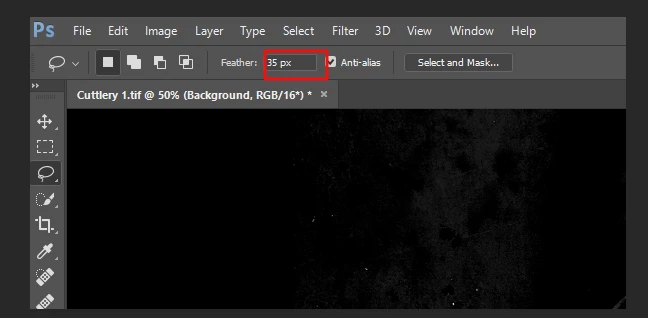
When ever a selection is made, it appears to 'snap back' to a kind of oval shape rather than the selection that I have created..

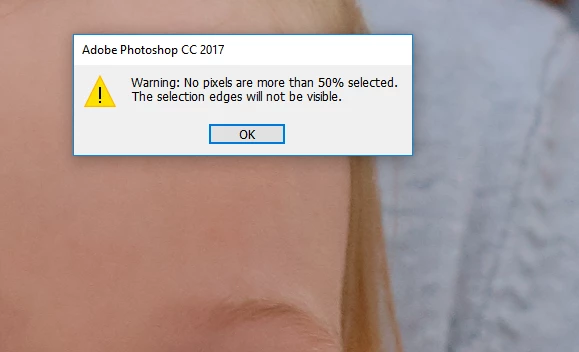
In addition, the attached error message keeps appearing.

Can anyone assist please ?
    This topic has been closed for replies.
    Correct answer Simmer1

    Hi,

    I noticed your feather is set to 35 px this is what would make it go to an oval shape.

    Try setting the feather to 0.

    Thanks,

    Sim

    3 replies

    Simmer1
    Community Expert
    Community Expert
    March 17, 2017

    Hi,

    From the second screenshot you sent I can see you have the locked background layer selected.

    Select the top Layer and it should work.

    Thanks,

    Sim

    Timp1
    Timp1Author
    Known Participant
    March 17, 2017

    Hi Sim...thank you for responding.

    Ironically, I went back and it would allow the 'delete' shortcut to work, and the removal of objects to take place on a locked background layer. As soon as I create another layer with a view to doing any removals on it, it will not allow the shortcut to work, or indeed any removals to take place ...

    Simmer1
    Community Expert
    Simmer1Community ExpertCorrect answer
    Community Expert
    March 17, 2017

    Hi,

    I noticed your feather is set to 35 px this is what would make it go to an oval shape.

    Try setting the feather to 0.

    Thanks,

    Sim

    Timp1
    Timp1Author
    Known Participant
    March 17, 2017

    Aha !

    Many thanks...I was feathering to retouch skin in frequency separation

    Now...whilst I have your attention ( ) ..I have another issue with the lasso tool.

    I use lasso -edit -fill to remove objects.

    This may also transpire to be user error, however the function no longer seems to be working on a created adjustment layer.

    It seems to be intermittent, and I'm wondering whether I am missing a box to check. When it doesn't  function, it appears as 'clear' in the history, but does not fill or remove the selected area...In addition the shortcut for 'edit - fill' (delete button) does not work on an adjustment layer .Can anyone assist please ?

    c.pfaffenbichler
    Community Expert
    Community Expert
    March 17, 2017

    What are the Tool’s settings in the Options Bar? (Please post a screenshot including the relevant elements.)

    Have you reset the Tool yet?

    Timp1
    Timp1Author
    Known Participant
    March 17, 2017

    Hi...does this illustrate enough ?

    And yes, I have tried resetting the tool