
Participant
June 20, 2021
Answered

Lasso tool selecting nothing and transform tool not working - photoshop for ipad

  • June 20, 2021
  • 2 replies
  • 5023 views

I recently started using Photoshop for the ipad and all the tools work fine, however, there seems to be a problem with the lasso tool.


I can draw around parts of a layer and select it. I can then move it around as I want - however, if I then try to transform that particular selected part, nothing happens.

The marching ants effect is there, and that resizes or rotates (whatever I want to do) but the actual part of the image it has selected, does nothing. (video attached to show what I mean)

I've looked everywhere for similar problems, thinking maybe there's something I'm missing, but cannot find any answers.


I even deleted the app and reinstalled.

My ipad is an ipad pro, versian 14.4.2

And Photoshop is versian 2.5
This topic has been closed for replies.
Correct answer jane-e


Hi @sleyf 


Here's what's going on:


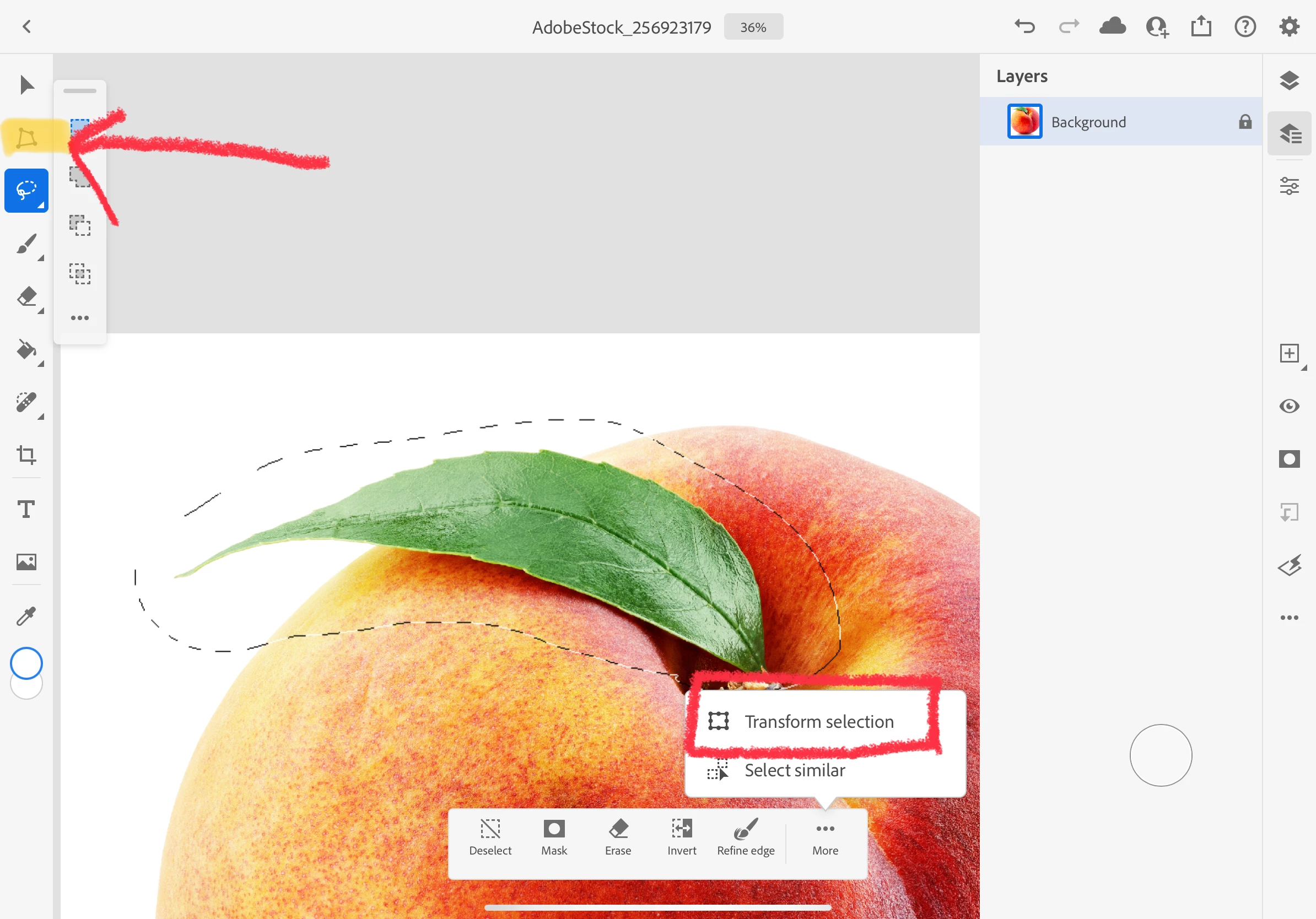
You clicked "Transform Selection" and the selection marquee is being transformed, or fine-tuned.


To transform the pixels, use the Transform tool in the toolbar (red arrow). These are two separate settings, and it is the same in Photoshop for desktop.


No, updating is not the right solution here, and it is two separate Tools with different purposes. On PS for desktop, Edit menu > Free Transform (Cmd+T) is for pixels while Select menu > Transform is for the selection marquee.


I hope this helps.


~ Jane


2 replies

jane-e
Community Expert
Community Expert
June 22, 2021

Hi

Since your question is about Photoshop for iPad, I have moved this from the Photoshop forum where you posted to PS for Mobile.


Because you posted a video, I couldn't quite see what is on each layer.


  • Can you confirm you are on the right layer?
  • For testing purposes, can you try the Lasso tool with Transform on another file?


~ Jane

sleyfAuthor
Participant
June 22, 2021

Hi there Jane,


Thanks, I wasn't sure if 'mobile' was just referring to the phone app or not, so just posted on the safest bet.


I was on the same layer as the lines, but I tried in a different file as you suggested and will attach a screenshot and video. It still doesn't appear to be working - although the transform tool works on its own on the entire layer, it just doesn't work if a part of it is selected with the lasso.

I've attached a screenshot to confirm layer selection

And a video for transdorm on its own, and trying to transform while a section is selected.


I also recently updated on suggestion of a colleague of yours, to v.2.6 which didn't solve the issue. I'm unsure if I'm using the tool wrong, but that's how I've used it for years on desktop Photoshop with no problems.

Sahil.Chawla
Adobe Employee
Adobe Employee
June 22, 2021

Hi there,

Could you please try installing the latest version of Photoshop for iPad which is 2.6 and let us know if that helps? https://helpx.adobe.com/photoshop/using/whats-new.html


Regards,
Sahil

sleyfAuthor
Participant
June 22, 2021

Hi Sahil,

(The update only just showed up in the Apple Store for me)


Unfortunately it hasn't solved the issue, transform is still not working when I lasso a section, it works on the entire image if I just use the transform option, but not if it's selected with the lasso