Participant
December 1, 2016
Answered

Layer click-and-drag problem

  • December 1, 2016
  • 2 replies
  • 9516 views

I've been told there is a feature in Adobe Photoshop CC 2017 where one can drag a layer directly from the layers panel in one tab into another tab simply by moving the grabbed layer over the destination tab at the top of the window. However, whenever I try this, the destination tab that I hover over with the selected layer doesn't come to the forefront, thereby preventing me from using this feature. Any suggestions?

This topic has been closed for replies.
Correct answer Nancy OShea

My girlfriend and I, on two separate systems, have this exact same problem.  Julienne Kost DOES this in her LDC PSCC ESS/Basic course but doesn't explain how.  We tried the above suggestion which created a lot of work getting back to where we were but didn't help at all.  Although various people on the net say this can't be done, it clearly can - somehow.  Anybody know what the secret is?


Which version of Photoshop do you have?

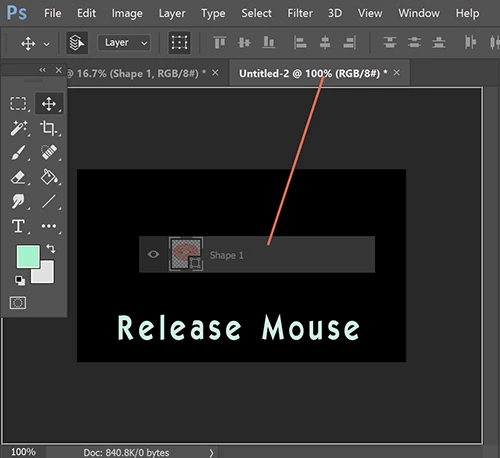
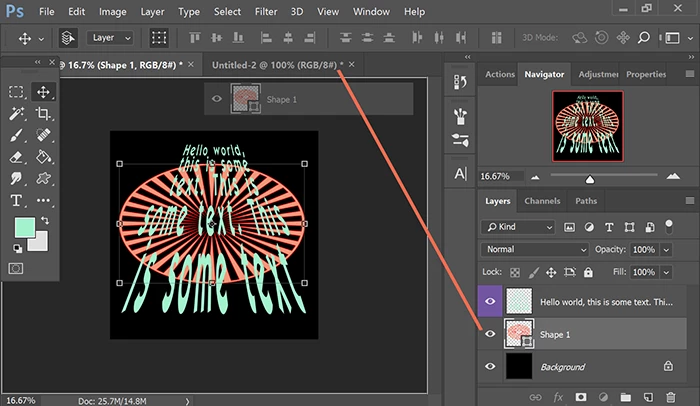
Open a multi-layered PSD file.  Click and hold the desired layer.  Drag to the target Tab and hold  a couple of seconds until the 2nd document appears.  Still holding, drag your layer over the open document and release your mouse. Voila! 

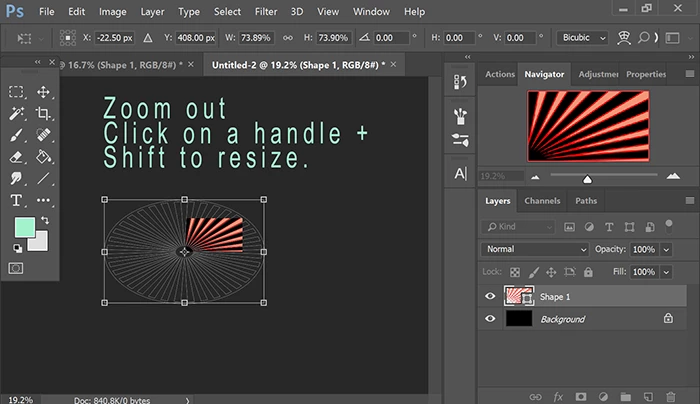
It goes without saying, you may need to resize the layer to fit your new canvas especially if they are a different size and resolution.  Use your Navigator panel to zoom in or out as needed.

Nancy

2 replies

rus5
Known Participant
April 7, 2018

Just wanted to follow up on this.  I updated my version of PS to 19.1.3 and the problem, at least for me, seems to finally be fixed.  Tried it several times over several days and it worked every time.  I hope the same is true for all the other folks who had this problem.  Much thanks to Julieanne and her co-workers for bringing it to the attention of the PS development team!

Chuck Uebele
Community Expert
Community Expert
December 1, 2016

Are you waiting long enough? I'm not having issues doing this, but there is a lag when the other tab becomes active.

Participant
December 2, 2016

Yes I've waited for over ten seconds

Chuck Uebele
Community Expert
Community Expert
December 2, 2016

Have you tried resetting the preferences?