
Layer Style Stroke Bug (File bug not PS)
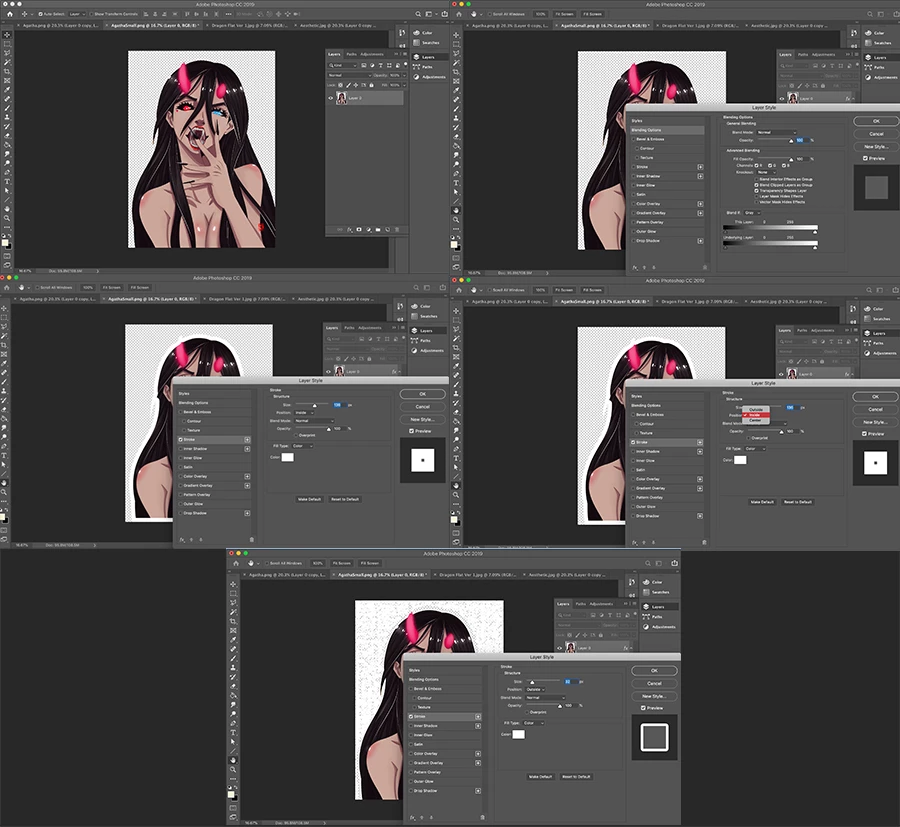
In the Image below I go over the steps I took to accomplish a basic outline. Incase you can't see the image or can't see it well enough the steps I took are as followed
Step1) Open Image
Step 2) Double click the layer (This brings up Layer Styles)
Step 3) Click Stroke and click the tab to see the options
Step 4) Changing the color to white (at this point everything is normal. It shows a white stroke perfectly lining the image)
Step5) Change the Stroke from Inner to Outer (also happens when I select center)
And this is where the weirdness is happening. At this point it shows a bunch of seemingly random white dots that change based on the option selected ( The center and outside options give different results but inner shows as expected. Now I did get the image from another with a solid yellow background but I don't think that this is where the problem arises seeing as how I've re-extrapolated the image, duplicated the image file and layer (separately), selected the layer by Command clicking the layer thumbnail then filled the new layer with the bucket tool and last but not least this same problem arises in Printful (a drop ship clothing service) and "dare I say" Affinity Photo (idk how taboo that is here)
Anyways, I'd really appreciate an answer one so I can learn to solve the actual problem and two because while I could just duplicate, expand and fill the bottom layer, the real problem drags into Printful and who knows where else I may run into this.
 AdChoices