
Inspiring
February 26, 2019
Answered

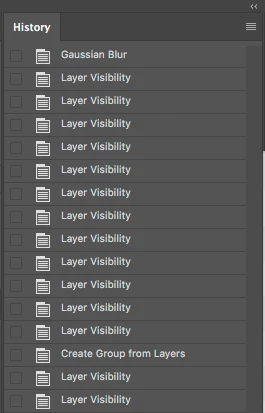
Layer visibility appears on History panel

  • February 26, 2019
  • 3 replies
  • 13620 views

Is there a way to stop Photoshop from showing "Layer Visibility" in the history log?

When I do final checks on an image, I tend to spam 'CMD + ,' to check for issues. It then fills up the history log and I don't recall previous versions acting this way. However, I could have changed a setting, so if anyone is aware of a solution it would be greatly appreciated.
Correct answer davescm

Click on the square at the top right of the history panel to get the drop down menu and choose "History Options".

Then uncheck "Make Layer Visibility Changes Undoable"

Dave

3 replies

Participating Frequently
December 18, 2023

It takes up history in a way that doesn't make any sense whatsoever.

kikogodeca
Participating Frequently
May 2, 2020

Saved my life, thanks!

Participant
July 14, 2022

Came turned on by default? THANKS Adobe: another BAD idea...

davescm
Community Expert
davescmCommunity ExpertCorrect answer
Community Expert
February 26, 2019

Click on the square at the top right of the history panel to get the drop down menu and choose "History Options".

Then uncheck "Make Layer Visibility Changes Undoable"

Dave

Inspiring
February 26, 2019

Nice one Dave, knew it would be a simple fix. I don't recall ever changing those settings.

Many Thanks to you!

davescm
Community Expert
Community Expert
February 26, 2019

Your'e welcome.    It was added in a recent update and came turned on by default.

Dave