lesley_hilton
Known Participant
June 11, 2019
Answered

[Locked] How do I adjust radius of rounded corners on a rectangle?

  • June 11, 2019
  • 1 reply
  • 1588 views

Hello,

Photoshop CC version 19.1.5

I used the rounded rectangle tool to create a rectangle, and I want to adjust the radius of the corners. OR create a new rectangle with options to adjust corner ratios. I can't find the place where you adjust the radius of the corners.

Please advise.
This topic has been closed for replies.
Correct answer

Hi

I replied to you in this thread

Rounded Corners to an Image

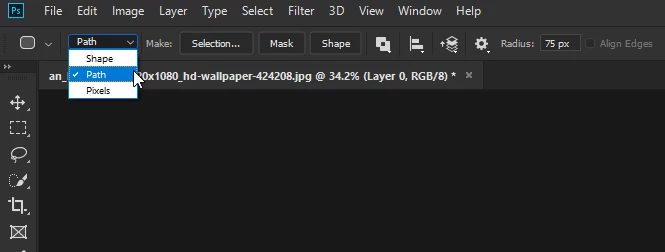
If you want better control you need to set the mode to Path

Then select the properties panel

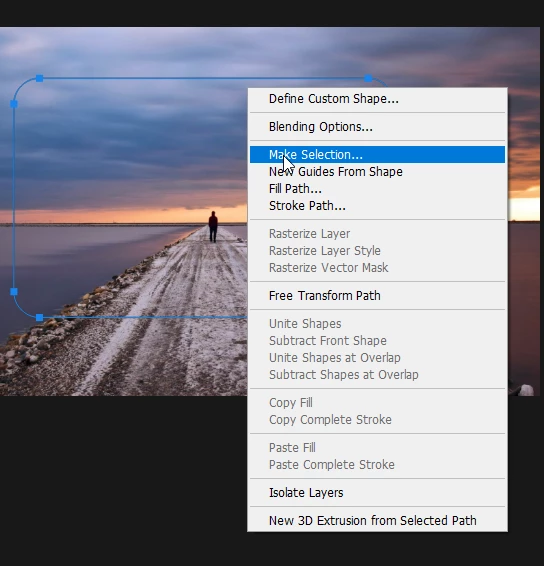
And if you want the Path as a selection just right click and select Make Selection

1 reply

Correct answer
June 11, 2019

Hi

I replied to you in this thread

Rounded Corners to an Image

If you want better control you need to set the mode to Path

Then select the properties panel

And if you want the Path as a selection just right click and select Make Selection

lesley_hilton
Known Participant
June 11, 2019

Thank you. But even when I select Path, that menu still does not appear. I don't know how to make that menu appear.

When I click window, properties, it just talks about masking, it doesn't list all the options in your second screenshot.

Lesley

June 11, 2019

Locking this thread as OP posting same questions in another thread

Rounded Corners to an Image